
BLOG
The Complete Guide to Compliance Training: How to Reduce Risk, Automate Renewals, and Stay Audit-Ready
Author: Mohana Radhakrishnan
BLOG
The Complete Guide to Compliance Training: How to Reduce Risk, Automate Renewals, and Stay Audit-Ready
Author: Mohana Radhakrishnan
Table of Contents
What is Enterprise Compliance Training?
Why Compliance Training Matters?
Compliance Training Challenges
- How to Control Compliance Requirements?
- How Does Role-Based Assignment Work?
- What Completion Criteria Matter?
- How to Automate Renewals?
- How to Enforce Compliance Workflows?
- How to Standardize Reporting?
Board-Level Compliance Reporting
Summary
Compliance training software helps large enterprises reduce risk, automate renewals, and stay audit-ready. This guide explains how to build a scalable compliance training program using role-based assignments, recertification workflows, standardized completion rules, audit trails, and reporting. It also shows why enterprises outgrow spreadsheets and basic LMS tools, and how platforms like ExpertusONE support governance, evidence retention, and compliance management across employees, contractors, partners, and other extended enterprise audiences.
Key Terms:
- Compliance Training
- Compliance Training Software
- Audit Trail
- Recertification
- Mandatory Training
- Risk Management
- Governance
What Does Compliance Training Mean for Large Enterprises?
Compliance training is structured education and policy reinforcement designed to ensure people follow:
- Laws and regulations
- Industry standards
- Internal policies and procedures
- Ethical and behavioral expectations
At enterprise scale, compliance training is not “a course.” It is a system that answers four questions reliably.
- What is required, and why?
Requirements come from regulations, internal policies, customer obligations, contractual commitments, and standards.
- Who is required to complete it, and when?
Requirements vary by job role, location, legal entity, business unit, worker type, and risk exposure.
- What counts as complete, and what evidence exists?
Completion may mean passing an assessment, attending an instructor-led session, acknowledging a policy, completing hands-on verification, or providing an external certificate.
- What happens when someone does not comply, and can the organization prove enforcement?
A defensible program shows reminders, escalations, and corrective steps, not just a list of overdue people.
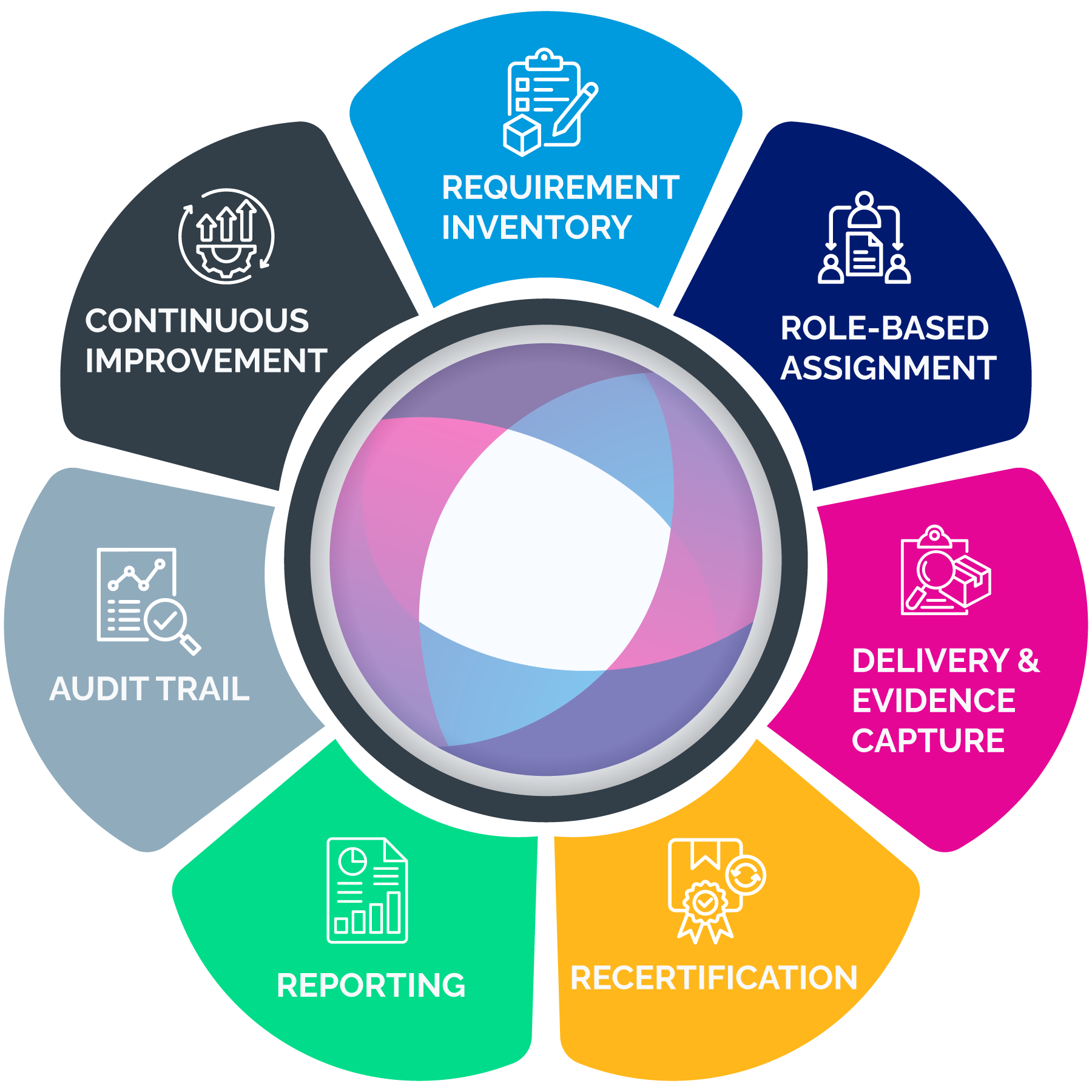
A mature compliance training program includes:
- A controlled inventory of compliance requirements
- Role-based assignment logic tied to systems of record (HR and identity data)
- Recertification and renewal management (expirations, windows, re-enrollment)
- Enforcement workflows (reminders, escalations, manager accountability)
- Reporting layers (operational dashboards and executive/board summaries)
- Audit trails (time stamps, version history, evidence retention, change logs)
- Governance controls (permissions, delegated administration, separation of duties)
- Extended enterprise support (partners, franchisees, dealers, contractors)
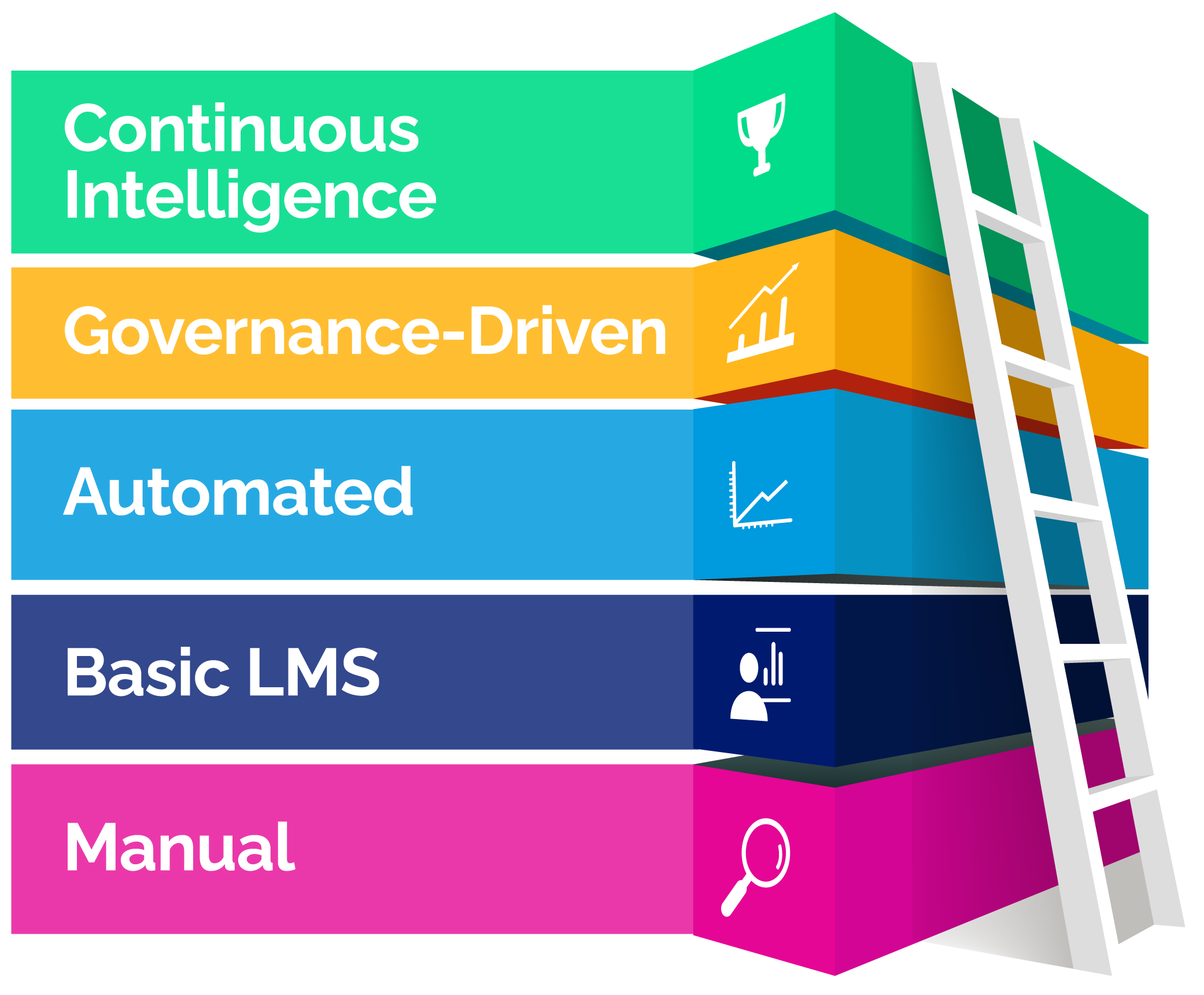
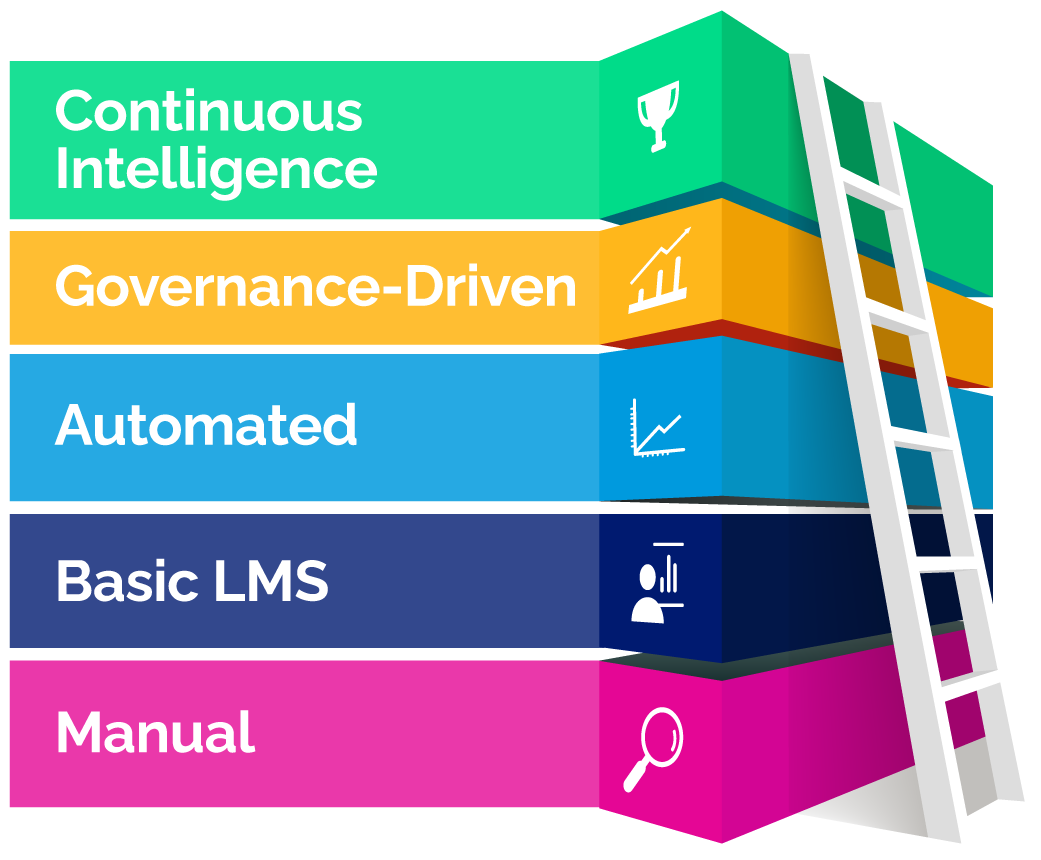
This is why many organizations outgrow spreadsheets and basic completion reports. They need compliance training software capabilities that manage governance and evidence at scale.
Why Does Compliance Training Matter?
Compliance training can feel like overhead until the moment it becomes a legal defense asset or an operational control that prevents harm. In enterprise environments, compliance training supports three business outcomes continuously:
- Risk reduction
- Accountability
- Defensibility
Regulators evaluate effectiveness, not intent
The DOJ Evaluation of Corporate Compliance Programs is explicit: prosecutors consider whether compliance programs are well designed, applied in good faith, and effective in practice.
Training is one of the easiest aspects of a compliance program to verify. If required training is inconsistently assigned, renewals are unmanaged, completion definitions differ by region, or records can be changed without audit logs, the program becomes harder to defend.
Cyber risk has a board-level financial impact
IBM’s 2025 breach report puts the global average cost at $4.4 million. Many incidents include human factors: phishing, credential misuse, improper data handling, policy violations, and process breakdowns. Security awareness training often sits inside compliance programs because it must be recurring, trackable, and auditable. Completion doesn’t guarantee prevention, but it becomes critical evidence when the organization is asked to show reasonable steps taken.
Leaders lean on compliance evidence
NIST research shows that leadership often treats compliance indicators as primary evidence when evaluating program success.
This doesn’t mean completion equals effectiveness. It means measurable compliance evidence is the baseline that leadership expects. A program that cannot produce consistent completion, renewal, and enforcement evidence quickly tends to lose trust under scrutiny.
Common Compliance Training Challenges in Large Organizations
Manual tracking that doesn’t scale
Spreadsheets and inbox reminders introduce silent failure modes: requirements drift, renewals lapse, data becomes inconsistent, and administrative effort grows faster than the program itself.
Fragmented systems and conflicting data
Enterprises often have an HR system, one or more learning systems, BI dashboards, and local tracking for certifications or rosters. When tools disagree, compliance becomes reconciliation work rather than risk management.
Audit scramble cycles
If evidence is assembled only when an audit arrives, errors multiply. The organization ends up defending the process instead of demonstrating control.
Inconsistent definitions of “complete.”
Not all compliance requirements are “take a course.” Some require rosters, passing scores, attestations, hands-on verification, or external credentials. Without standardized definitions, executive reporting becomes unreliable.
Overreliance on completion rates
Completion is necessary evidence, but not the whole program. Programs often fail in renewals, weak enforcement, missing version control, and poor permissions discipline.
Extended enterprise blind spots
Dealers, franchisees, contractors, and partners often represent compliance exposure, yet fall outside core HR systems and standard reporting.
Building a Compliance Training Program That Scales
1. Create a controlled inventory of requirements
A scalable program begins with a requirements catalog that includes:
- Requirement name and category (ethics, privacy, safety, regulatory, operational)
- Driver (regulation, policy, contract, customer mandate)
- Audience definition (roles, regions, entities, worker types, risk tiers)
- Recurrence rule (hire, annual, biennial, role change, incident-triggered)
- Evidence rule (completion, score, roster, attestation, external certificate)
- Retention expectation (how long records must remain accessible)
This inventory becomes the backbone for assignment rules and reporting definitions. Without it, you end up with inconsistent assignments and weak evidence.
2. Use role-based assignment logic tied to systems of record
Manual enrollment lists go stale immediately. Enterprises should drive assignments from stable attributes such as job family, job code, location, legal entity, business unit, worker type, and risk tier.
Role-based logic prevents two expensive failure modes:
- Undertraining: compliance gaps that create exposure
- Overtraining: unnecessary assignments that create learner fatigue and lower completion rates
3. Define the completion criteria that auditors will accept
Define “complete” per the requirement:
- Course completion with a time stamp
- Passing score threshold with attempt history
- Attendance verification for instructor-led sessions
- Supervisor sign-off for hands-on verification
- Policy acknowledgment with version control
- External certificate upload/validation, where applicable
Once completion criteria are defined, standardize them in reporting so leaders can trust metrics across regions.
4. Make renewals and recertification automatic
Most compliance programs fail in renewals. A scalable approach includes:
- Re-enrollment windows (often 30–60 days before expiration)
- Reminder cadence and escalation rules
- Visibility into upcoming expirations by cohort
- Exceptions with documentation (leave, waivers, local requirements)
- Treat renewals as routine operations, not annual emergencies.
5. Build enforcement workflows that don’t rely on heroic effort
A defensible workflow typically includes:
- Automated reminders to learners
- Escalation to managers after defined thresholds
- Escalation to compliance leadership for high-risk roles or repeat failures
- Documented remediation for persistent non-compliance
If enforcement is inconsistent, the program becomes harder to defend under scrutiny.
6. Standardize reporting definitions before building dashboards
Dashboards don’t fix inconsistent definitions. Standardize:
- Assigned (required by policy or rule)
- In progress (what counts as progress)
- Complete (defined evidence achieved)
- Overdue (past due date or renewal window, factoring role changes)
Without standard definitions, executive reporting becomes political and fragile.
How to Track Compliance?
Tracking is a set of views that answer different questions.
Operational views for compliance and L&D teams
- Overdue queue: who is overdue now and why
- Expiration forecast: who will become non-compliant in 30/60/90 days
- Exceptions: those who have waivers and approvals
- High-risk cohorts: regulated roles, supervisors, safety-sensitive roles
- Regional variance: posture by location/legal entity
- Manager accountability: recurring overdue patterns by manager or unit
Executive views for leadership
Executives typically want fewer metrics, but they must be reliable:
- Compliance posture by requirement category
- Overdue exposure by region and role family
- Expiration and renewal risk
- >Trends over time and remediation actions
Audit Trails: How to Make Compliance Defensible
Reporting provides visibility. Audit trails provide proof.
A defensible audit trail includes:
- Proof of assignment logic (who was required and why)
- Proof of completion (time-stamped records)
- Proof of version (what content/policy version was acknowledged)
- Proof of enforcement (escalations, reminders, corrective steps)
- Proof of controls (who can modify records, with logged changes)
A practical way to reduce audit scramble is to maintain an evidence package for major requirement categories that includes:
- Requirement definition and governance owner
- Audience and assignment rules
- Completion criteria definition
- Standard export report format and time stamp
- Policy/training version history
- Exception/waiver logic and approvals
- Administrative access controls summary
The goal is to make evidence retrieval routine.
What are the Essential Compliance Tools Enterprises Need?
Enterprise compliance programs usually fail because the system cannot keep up. Roles change, requirements vary by region, certifications expire, and evidence gets scattered across tools. The right compliance tools make required training repeatable, auditable, and manageable without adding administrative overhead.
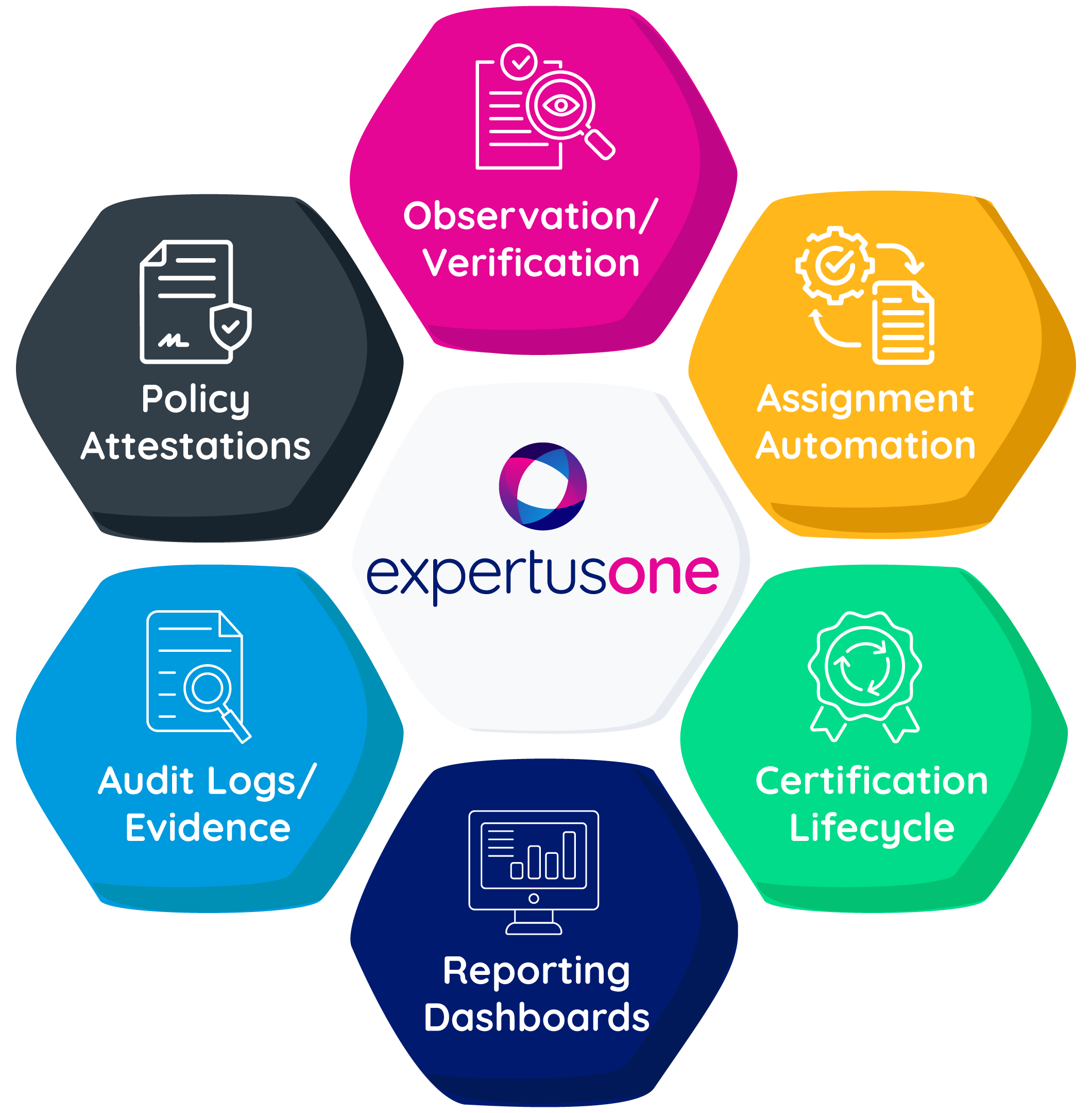
Below are the core tool categories most enterprises need, along with how those capabilities can be supported in ExpertusONE.
1. Role-based assignment and automation
Manual enrollment lists are a predictable failure point at scale. Enterprises need a rule-based assignment that targets required training by role, location, legal entity, worker type, and risk exposure, and updates automatically when employees move roles or regions. This is the foundation for consistent enforcement because reminders and escalations only work if assignment logic is accurate.
ExpertusONE supports this through its compliance and required training solution, which is built around managing required training centrally, automating assignments and reminders, and keeping compliance status visible without heavy manual work.
2. Certification and recertification management
Many compliance programs don’t fail at initial completion. They fail quietly in renewals. Certification management tools track expiration dates, trigger recertification windows, automate reminders, and make renewal exposure visible before an audit forces the issue. Strong programs also need historical evidence—proof of who was certified when and what they completed at that time.
ExpertusONE supports quick visibility into credentials and completion status through the ONE-Profile Card, which is designed to surface verified training and credential information in a format that’s easy to check in the flow of work.
Case study: See how a healthcare non-profit simplified nurse training, certification management, and compliance with state requirements.
3. Compliance reporting and analytics
Compliance reporting is how organizations demonstrate control. Enterprise teams need both operational reporting (overdue queues, expiring certifications, exceptions) and executive reporting (risk posture, renewal exposure, remediation progress). Reporting should be consistent across regions and easy to export for audits, without requiring manual reconciliation each time.
ExpertusONE supports these reporting needs through ExpertusONE Insights, which provides dashboards and analytics for monitoring compliance status across audiences and pulling reports that stakeholders can use for oversight and audit requests.
4. Audit trail and evidence integrity
Audits don’t ask whether training was offered. They ask whether the organization can prove what happened, when it happened, and what changed afterward. Audit-ready compliance tools provide time-stamped completion records, version history, administrative change logs, and fast evidence retrieval. This is the difference between “completion reporting” and defensible audit readiness.
ExpertusONE is designed to support audit readiness by making it easier to retain completion history and produce defensible reporting when auditors ask for proof.
5. Content versioning and controlled content management
Compliance requirements evolve. Policies change. Procedures are updated. A defensible program must show which version of training or policy a learner completed or acknowledged. Without version control, organizations can’t prove training aligned with the policy state at the time of completion.
ExpertusONE supports this through smart content creation and management tools (such as Interaction Studio), which focus on creating, managing, updating, and distributing content with governance controls. This is useful when compliance materials need to be updated and tracked consistently.
Case study: See how an automotive systems manufacturer migrated to a modern LMS while preserving content, enabling versioning, and improving reporting for compliance-driven training.
6. Policy acknowledgments and e-signature workflows
Many compliance obligations are “acknowledge this” rather than “learn this.” Code of conduct updates, cybersecurity policies, SOP changes, and privacy practices often require documented attestation with version history and exportable proof. In regulated environments, e-signature verification can add an extra layer of defensibility.
In regulated environments such as healthcare, compliance often depends on tighter record control and verification steps like e-signatures, which are included in ExpertusONE’s suite of compliance-tracking tools.
7. Observation and competency validation
In many industries, compliance includes real-world performance: safety procedures, equipment operation, clinical competencies, and field processes. If the system can’t capture skills validation digitally, evidence often ends up on paper or in local spreadsheets and becomes difficult to retrieve during audits.
ExpertusONE supports hands-on validation through the Observation Checklist, which provides structured digital checklists to document observations and competency verification alongside training records.
8. Quick verification for distributed and deskless workforces
Some compliance moments happen at the point of work: verifying someone is certified, confirming training status before a shift, or proving credentials during an inspection. Quick verification tools reduce friction and make compliance status accessible when it matters.
ExpertusONE supports this with the ONE-Profile Card, which makes it easier for supervisors and teams to confirm training and credential status without relying on back-office reporting workflows.
Case study: See how teams track and verify compliance status quickly for any learner, anywhere.
Board-Level Reporting Framework
Boards don’t need course lists. They need risk intelligence: where exposure exists, what’s changing, and what the organization is doing about it.
A board-ready compliance reporting pack typically includes:
- Compliance posture snapshot
Overall compliance rates for major requirement categories, overdue trend vs last quarter, and variance by high-risk cohorts. - Certification and renewal exposure
Expiring certifications in the next 30/60/90 days, renewal failure hot spots, and roles where lapses create high exposure. - Enforcement and remediation
Escalation backlog, time-to-resolution, repeat non-compliance patterns, and corrective actions taken. - Program improvement indicators
Evidence of continuous improvement: refreshed policies/training, updated assignment rules, audit learnings, targeted reinforcement campaigns.
This aligns with the DOJ’s emphasis on practical effectiveness.
Where ExpertusONE Fits: Compliance Training Built for Enterprise Complexity
Enterprise teams need systems that reduce risk without scaling chaos. ExpertusONE is designed for large, global organizations that need strong governance, role-based access controls, and audit-ready reporting.
In practical compliance terms, ExpertusONE is relevant when you need:
- Role-based assignment logic that stays accurate during organizational change
- Governance controls that reduce administrative sprawl and protect evidence integrity
- Tracking and reporting that scales across regions, business units, and audiences
- Audit-ready documentation that can be retrieved quickly and consistently
- Support for extended enterprise compliance (customers, partners, franchises, dealers)
For teams evaluating platform options, further reading is available here:
- ExpertusONE’s Compliance & Required Training Solution
- ExpertusONE Case Studies
- ExpertusONE Case Summaries
Key Takeaways
Compliance training is risk infrastructure, not an annual content exercise.
Regulators evaluate whether compliance programs are effective in practice, not merely documented.
Cyber risk is financially material; IBM reports the global average breach cost reached $4.4 million in 2025.
Always-on compliance reduces renewal failures and audit scramble by making assignment updates, renewals, escalation, and evidence retention routine.
Tracking and reporting provide visibility; audit trails provide defensible proof. Both are required for audit readiness.
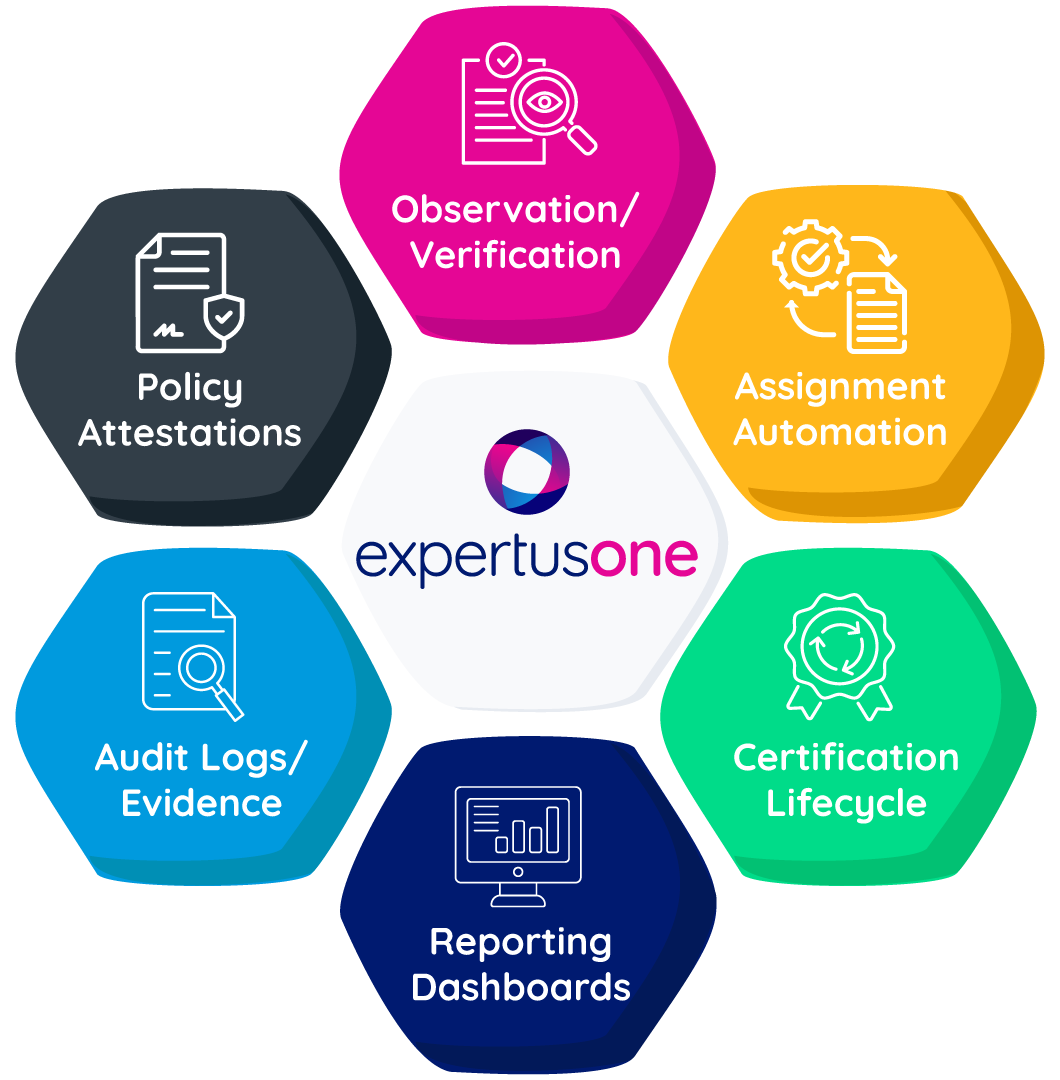
Enterprise compliance depends on a practical toolset: assignment automation, certification lifecycle management, reporting dashboards, audit evidence/change logs, and policy attestation workflows.
FAQs
Compliance training is required education and policy reinforcement designed to ensure learners understand and follow legal, regulatory, and internal obligations. In enterprise environments, it also includes assignment governance, renewal management, reporting, and audit-ready evidence.
Compliance training software is a platform designed to manage required training at scale, including automated role-based assignments, recertification cycles, policy acknowledgments, audit trails, and executive reporting.
Tracking provides operational visibility (assigned, overdue, expiring, trends). Audit trails provide defensible proof (time-stamped records, version history, change logs, and exportable evidence packages).
Most enterprise programs need tools that automate required training at scale and produce defensible evidence. That typically includes role-based assignment and recertification management, real-time compliance reporting, audit-ready records with change logs and version control, policy acknowledgments (often with verification such as e-signatures), and ways to capture hands-on validation or credential checks for distributed workforces.
ExpertusONE supports governance-driven required training with scalable tracking and reporting, role-based administrative control, audit-ready documentation, and multi-audience environments, including extended enterprise learners.
About the Author:
Mohana Radhakrishnan is the co-founder and Chief Operating Officer of ExpertusONE, where she helps shape the company’s strategic direction while overseeing operations, business performance, and execution across the organization. She works closely with customers to help large, complex enterprises strengthen compliance, improve training outcomes, and deliver learning experiences that keep employees and stakeholders engaged.
Summary
Compliance training software helps large enterprises reduce risk, automate renewals, and stay audit-ready. This guide explains how to build a scalable compliance training program using role-based assignments, recertification workflows, standardized completion rules, audit trails, and reporting. It also shows why enterprises outgrow spreadsheets and basic LMS tools, and how platforms like ExpertusONE support governance, evidence retention, and compliance management across employees, contractors, partners, and other extended enterprise audiences.
Key Terms:
- Compliance Training
- Compliance Training Software
- Audit Trail
- Recertification
- Mandatory Training
- Risk Management
- Governance
What Does Compliance Training Mean for Large Enterprises?
Compliance training is structured education and policy reinforcement designed to ensure people follow:
- Laws and regulations
- Industry standards
- Internal policies and procedures
- Ethical and behavioral expectations
At enterprise scale, compliance training is not “a course.” It is a system that answers four questions reliably.
- What is required, and why?
Requirements come from regulations, internal policies, customer obligations, contractual commitments, and standards.
- Who is required to complete it, and when?
Requirements vary by job role, location, legal entity, business unit, worker type, and risk exposure.
- What counts as complete, and what evidence exists?
Completion may mean passing an assessment, attending an instructor-led session, acknowledging a policy, completing hands-on verification, or providing an external certificate.
- What happens when someone does not comply, and can the organization prove enforcement?
A defensible program shows reminders, escalations, and corrective steps, not just a list of overdue people.
A mature compliance training program includes:
- A controlled inventory of compliance requirements
- Role-based assignment logic tied to systems of record (HR and identity data)
- Recertification and renewal management (expirations, windows, re-enrollment)
- Enforcement workflows (reminders, escalations, manager accountability)
- Reporting layers (operational dashboards and executive/board summaries)
- Audit trails (time stamps, version history, evidence retention, change logs)
- Governance controls (permissions, delegated administration, separation of duties)
- Extended enterprise support (partners, franchisees, dealers, contractors)
This is why many organizations outgrow spreadsheets and basic completion reports. They need compliance training software capabilities that manage governance and evidence at scale.
Why Does Compliance Training Matter?
Compliance training can feel like overhead until the moment it becomes a legal defense asset or an operational control that prevents harm. In enterprise environments, compliance training supports three business outcomes continuously:
- Risk reduction
- Accountability
- Defensibility
Regulators evaluate effectiveness, not intent
The DOJ Evaluation of Corporate Compliance Programs is explicit: prosecutors consider whether compliance programs are well designed, applied in good faith, and effective in practice.
Training is one of the easiest aspects of a compliance program to verify. If required training is inconsistently assigned, renewals are unmanaged, completion definitions differ by region, or records can be changed without audit logs, the program becomes harder to defend.
Cyber risk has a board-level financial impact
IBM’s 2025 breach report puts the global average cost at $4.4 million. Many incidents include human factors: phishing, credential misuse, improper data handling, policy violations, and process breakdowns. Security awareness training often sits inside compliance programs because it must be recurring, trackable, and auditable. Completion doesn’t guarantee prevention, but it becomes critical evidence when the organization is asked to show reasonable steps taken.
Leaders lean on compliance evidence
NIST research shows that leadership often treats compliance indicators as primary evidence when evaluating program success.
This doesn’t mean completion equals effectiveness. It means measurable compliance evidence is the baseline that leadership expects. A program that cannot produce consistent completion, renewal, and enforcement evidence quickly tends to lose trust under scrutiny.
Common Compliance Training Challenges in Large Organizations
Manual tracking that doesn’t scale
Spreadsheets and inbox reminders introduce silent failure modes: requirements drift, renewals lapse, data becomes inconsistent, and administrative effort grows faster than the program itself.
Fragmented systems and conflicting data
Enterprises often have an HR system, one or more learning systems, BI dashboards, and local tracking for certifications or rosters. When tools disagree, compliance becomes reconciliation work rather than risk management.
Audit scramble cycles
If evidence is assembled only when an audit arrives, errors multiply. The organization ends up defending the process instead of demonstrating control.
Inconsistent definitions of “complete.”
Not all compliance requirements are “take a course.” Some require rosters, passing scores, attestations, hands-on verification, or external credentials. Without standardized definitions, executive reporting becomes unreliable.
Overreliance on completion rates
Completion is necessary evidence, but not the whole program. Programs often fail in renewals, weak enforcement, missing version control, and poor permissions discipline.
Extended enterprise blind spots
Dealers, franchisees, contractors, and partners often represent compliance exposure, yet fall outside core HR systems and standard reporting.
Building a Compliance Training Program That Scales
1. Create a controlled inventory of requirements
A scalable program begins with a requirements catalog that includes:
- Requirement name and category (ethics, privacy, safety, regulatory, operational)
- Driver (regulation, policy, contract, customer mandate)
- Audience definition (roles, regions, entities, worker types, risk tiers)
- Recurrence rule (hire, annual, biennial, role change, incident-triggered)
- Evidence rule (completion, score, roster, attestation, external certificate)
- Retention expectation (how long records must remain accessible)
This inventory becomes the backbone for assignment rules and reporting definitions. Without it, you end up with inconsistent assignments and weak evidence.
2. Use role-based assignment logic tied to systems of record
Manual enrollment lists go stale immediately. Enterprises should drive assignments from stable attributes such as job family, job code, location, legal entity, business unit, worker type, and risk tier.
Role-based logic prevents two expensive failure modes:
- Undertraining: compliance gaps that create exposure
- Overtraining: unnecessary assignments that create learner fatigue and lower completion rates
3. Define the completion criteria that auditors will accept
Define “complete” per the requirement:
- Course completion with a time stamp
- Passing score threshold with attempt history
- Attendance verification for instructor-led sessions
- Supervisor sign-off for hands-on verification
- Policy acknowledgment with version control
- External certificate upload/validation, where applicable
Once completion criteria are defined, standardize them in reporting so leaders can trust metrics across regions.
4. Make renewals and recertification automatic
Most compliance programs fail in renewals. A scalable approach includes:
- Re-enrollment windows (often 30–60 days before expiration)
- Reminder cadence and escalation rules
- Visibility into upcoming expirations by cohort
- Exceptions with documentation (leave, waivers, local requirements)
- Treat renewals as routine operations, not annual emergencies.
5. Build enforcement workflows that don’t rely on heroic effort
A defensible workflow typically includes:
- Automated reminders to learners
- Escalation to managers after defined thresholds
- Escalation to compliance leadership for high-risk roles or repeat failures
- Documented remediation for persistent non-compliance
If enforcement is inconsistent, the program becomes harder to defend under scrutiny.
6. Standardize reporting definitions before building dashboards
Dashboards don’t fix inconsistent definitions. Standardize:
- Assigned (required by policy or rule)
- In progress (what counts as progress)
- Complete (defined evidence achieved)
- Overdue (past due date or renewal window, factoring role changes)
Without standard definitions, executive reporting becomes political and fragile.
How to Track Compliance?
Tracking is a set of views that answer different questions.
Operational views for compliance and L&D teams
- Overdue queue: who is overdue now and why
- Expiration forecast: who will become non-compliant in 30/60/90 days
- Exceptions: those who have waivers and approvals
- High-risk cohorts: regulated roles, supervisors, safety-sensitive roles
- Regional variance: posture by location/legal entity
- Manager accountability: recurring overdue patterns by manager or unit
Executive views for leadership
Executives typically want fewer metrics, but they must be reliable:
- Compliance posture by requirement category
- Overdue exposure by region and role family
- Expiration and renewal risk
- Trends over time and remediation actions
Audit Trails: How to Make Compliance Defensible
Reporting provides visibility. Audit trails provide proof.
A defensible audit trail includes:
- Proof of assignment logic (who was required and why)
- Proof of completion (time-stamped records)
- Proof of version (what content/policy version was acknowledged)
- Proof of enforcement (escalations, reminders, corrective steps)
- Proof of controls (who can modify records, with logged changes)
A practical way to reduce audit scramble is to maintain an evidence package for major requirement categories that includes:
- Requirement definition and governance owner
- Audience and assignment rules
- Completion criteria definition
- Standard export report format and time stamp
- Policy/training version history
- Exception/waiver logic and approvals
- Administrative access controls summary
The goal is to make evidence retrieval routine.
What are the Essential Compliance Tools Enterprises Need?
Enterprise compliance programs usually fail because the system cannot keep up. Roles change, requirements vary by region, certifications expire, and evidence gets scattered across tools. The right compliance tools make required training repeatable, auditable, and manageable without adding administrative overhead.
Below are the core tool categories most enterprises need, along with how those capabilities can be supported in ExpertusONE.
1. Role-based assignment and automation
Manual enrollment lists are a predictable failure point at scale. Enterprises need a rule-based assignment that targets required training by role, location, legal entity, worker type, and risk exposure, and updates automatically when employees move roles or regions. This is the foundation for consistent enforcement because reminders and escalations only work if assignment logic is accurate.
ExpertusONE supports this through its compliance and required training solution, which is built around managing required training centrally, automating assignments and reminders, and keeping compliance status visible without heavy manual work.
2. Certification and recertification management
Many compliance programs don’t fail at initial completion. They fail quietly in renewals. Certification management tools track expiration dates, trigger recertification windows, automate reminders, and make renewal exposure visible before an audit forces the issue. Strong programs also need historical evidence—proof of who was certified when and what they completed at that time.
ExpertusONE supports quick visibility into credentials and completion status through the ONE-Profile Card, which is designed to surface verified training and credential information in a format that’s easy to check in the flow of work.
Case study: See how a healthcare non-profit simplified nurse training, certification management, and compliance with state requirements.
3. Compliance reporting and analytics
Compliance reporting is how organizations demonstrate control. Enterprise teams need both operational reporting (overdue queues, expiring certifications, exceptions) and executive reporting (risk posture, renewal exposure, remediation progress). Reporting should be consistent across regions and easy to export for audits, without requiring manual reconciliation each time.
ExpertusONE supports these reporting needs through ExpertusONE Insights, which provides dashboards and analytics for monitoring compliance status across audiences and pulling reports that stakeholders can use for oversight and audit requests.
4. Audit trail and evidence integrity
Audits don’t ask whether training was offered. They ask whether the organization can prove what happened, when it happened, and what changed afterward. Audit-ready compliance tools provide time-stamped completion records, version history, administrative change logs, and fast evidence retrieval. This is the difference between “completion reporting” and defensible audit readiness.
ExpertusONE is designed to support audit readiness by making it easier to retain completion history and produce defensible reporting when auditors ask for proof.
5. Content versioning and controlled content management
Compliance requirements evolve. Policies change. Procedures are updated. A defensible program must show which version of training or policy a learner completed or acknowledged. Without version control, organizations can’t prove training aligned with the policy state at the time of completion.
ExpertusONE supports this through smart content creation and management tools (such as Interaction Studio), which focus on creating, managing, updating, and distributing content with governance controls. This is useful when compliance materials need to be updated and tracked consistently.
Case study: See how an automotive systems manufacturer migrated to a modern LMS while preserving content, enabling versioning, and improving reporting for compliance-driven training.
6. Policy acknowledgments and e-signature workflows
Many compliance obligations are “acknowledge this” rather than “learn this.” Code of conduct updates, cybersecurity policies, SOP changes, and privacy practices often require documented attestation with version history and exportable proof. In regulated environments, e-signature verification can add an extra layer of defensibility.
In regulated environments such as healthcare, compliance often depends on tighter record control and verification steps like e-signatures, which are included in ExpertusONE’s suite of compliance-tracking tools.
7. Observation and competency validation
In many industries, compliance includes real-world performance: safety procedures, equipment operation, clinical competencies, and field processes. If the system can’t capture skills validation digitally, evidence often ends up on paper or in local spreadsheets and becomes difficult to retrieve during audits.
ExpertusONE supports hands-on validation through the Observation Checklist, which provides structured digital checklists to document observations and competency verification alongside training records.
8. Quick verification for distributed and deskless workforces
Some compliance moments happen at the point of work: verifying someone is certified, confirming training status before a shift, or proving credentials during an inspection. Quick verification tools reduce friction and make compliance status accessible when it matters.
ExpertusONE supports this with the ONE-Profile Card, which makes it easier for supervisors and teams to confirm training and credential status without relying on back-office reporting workflows.
Case study: See how teams track and verify compliance status quickly for any learner, anywhere.
Board-Level Reporting Framework
Boards don’t need course lists. They need risk intelligence: where exposure exists, what’s changing, and what the organization is doing about it.
A board-ready compliance reporting pack typically includes:
- Compliance posture snapshot
Overall compliance rates for major requirement categories, overdue trend vs last quarter, and variance by high-risk cohorts. - Certification and renewal exposure
Expiring certifications in the next 30/60/90 days, renewal failure hot spots, and roles where lapses create high exposure. - Enforcement and remediation
Escalation backlog, time-to-resolution, repeat non-compliance patterns, and corrective actions taken. - Program improvement indicators
Evidence of continuous improvement: refreshed policies/training, updated assignment rules, audit learnings, targeted reinforcement campaigns.
This aligns with the DOJ’s emphasis on practical effectiveness.
Where ExpertusONE Fits: Compliance Training Built for Enterprise Complexity
Enterprise teams need systems that reduce risk without scaling chaos. ExpertusONE is designed for large, global organizations that need strong governance, role-based access controls, and audit-ready reporting.
In practical compliance terms, ExpertusONE is relevant when you need:
- Role-based assignment logic that stays accurate during organizational change
- Governance controls that reduce administrative sprawl and protect evidence integrity
- Tracking and reporting that scales across regions, business units, and audiences
- Audit-ready documentation that can be retrieved quickly and consistently
- Support for extended enterprise compliance (customers, partners, franchises, dealers)
For teams evaluating platform options, further reading is available here:
Key Takeaways
Compliance training is risk infrastructure, not an annual content exercise.
Regulators evaluate whether compliance programs are effective in practice, not merely documented.
Cyber risk is financially material; IBM reports the global average breach cost reached $4.4 million in 2025.
Always-on compliance reduces renewal failures and audit scramble by making assignment updates, renewals, escalation, and evidence retention routine.
Tracking and reporting provide visibility; audit trails provide defensible proof. Both are required for audit readiness.
Enterprise compliance depends on a practical toolset: assignment automation, certification lifecycle management, reporting dashboards, audit evidence/change logs, and policy attestation workflows.
FAQs
Compliance training is required education and policy reinforcement designed to ensure learners understand and follow legal, regulatory, and internal obligations. In enterprise environments, it also includes assignment governance, renewal management, reporting, and audit-ready evidence.
Compliance training software is a platform designed to manage required training at scale, including automated role-based assignments, recertification cycles, policy acknowledgments, audit trails, and executive reporting.
Tracking provides operational visibility (assigned, overdue, expiring, trends). Audit trails provide defensible proof (time-stamped records, version history, change logs, and exportable evidence packages).
Most enterprise programs need tools that automate required training at scale and produce defensible evidence. That typically includes role-based assignment and recertification management, real-time compliance reporting, audit-ready records with change logs and version control, policy acknowledgments (often with verification such as e-signatures), and ways to capture hands-on validation or credential checks for distributed workforces.
ExpertusONE supports governance-driven required training with scalable tracking and reporting, role-based administrative control, audit-ready documentation, and multi-audience environments, including extended enterprise learners.
About the Author:
Mohana Radhakrishnan is the co-founder and Chief Operating Officer of ExpertusONE, where she helps shape the company’s strategic direction while overseeing operations, business performance, and execution across the organization. She works closely with customers to help large, complex enterprises strengthen compliance, improve training outcomes, and deliver learning experiences that keep employees and stakeholders engaged.


