
BLOG
The Complete Guide to Customer Training
 Author: Gordon Johnson
BLOG
The Complete Guide to Customer Training
Author: Gordon Johnson
Table of Contents
Business Impact of Customer Training
Designing Customer Training Programs
Digital-First Customer Training
Creating Customer Learning Experiences
Platform Features for Customer Training
Best Practices in Customer Enablement
ExpertusONE Support for Customer Training & Enablement
Building a Customer Training Program
Customer training helps customers understand, adopt, and get more value from your products or services. For enterprise organizations, it is also a way to improve customer experience, reduce support friction, strengthen retention, and create more consistent engagement after the sale. This guide explains what customer training is, why it matters, how to design effective programs, and what to look for in a platform that can support customer enablement at scale.
Key Terms:
- Customer Training
- Customer Enablement
- Customer Education
- Digital Customer Training
- Customer Onboarding
- Product Adoption
- Customer Retention
- Extended Enterprise Learning
What is Customer Training?
Customer training is the process of helping customers understand how to use a product, service, platform, or solution effectively.
It can include onboarding courses, how-to tutorials, product walkthroughs, certification programs, best-practice guides, live training sessions, knowledge libraries, community learning, and ongoing education after implementation. The goal is not just to explain features. The goal is to help customers achieve outcomes.
That distinction matters. A customer can buy a product and still fail to adopt it. They can attend a kickoff call and still miss important workflows. They can receive documentation and still need help applying it in their own environment. Customer training closes that gap by giving customers structured, accessible, and repeatable ways to learn.
For many organizations, customer training is part of a broader customer enablement strategy. Customer enablement focuses on giving customers the knowledge, resources, tools, and confidence they need to succeed across the full customer lifecycle.
Why Does Customer Training Matter?
Customer experience does not end when a contract is signed or a product is delivered. In many industries, that is when the real experience begins. Customers need to understand what they have bought, how to use it, where to find support, and how to get more value over time. When that education is missing, customers are more likely to become frustrated, underuse the product, rely heavily on support, or question the value of the relationship.
Bain & Company has reported that companies that excel at customer experience grow revenues 4% to 8% above their market, largely because better experiences support loyalty, repeat purchases, and advocacy. Customer training is one practical way to improve that experience because it gives customers the confidence and clarity they need to succeed.
Strong customer training can help organizations:
- Improve product adoption
- Reduce avoidable support requests
- Shorten time to value
- Build customer confidence
- Increase retention
- Support upsell and expansion opportunities
- Create more consistent onboarding
- Turn customers into advocates
This is especially important when products are complex, technical, regulated, configurable, or business-critical. In those environments, customers rarely need a single explanation. They need an ongoing learning experience.
Customer Training vs. Customer Enablement
Customer training and customer enablement are closely related, but they are not exactly the same.
Customer training usually refers to the learning content and experiences provided to customers. This includes courses, videos, tutorials, webinars, guides, certifications, and assessments.
Customer enablement is broader. It includes training, but also the systems, resources, communication, support, and success processes that help customers achieve their goals.
In simple terms:
- Customer training teaches customers how to use, apply, or benefit from something.
- Customer enablement helps customers succeed before, during, and after that learning experience.
A good customer enablement strategy usually depends on good customer training. Without structured learning, enablement becomes reactive. Teams answer the same questions repeatedly, customer success managers become informal trainers, and customers are left to piece together information from help articles, support tickets, onboarding calls, and internal champions.
The Business Impact of Customer Training
Customer training is often treated as a support function. In reality, it can influence some of the most important commercial outcomes in the customer lifecycle.
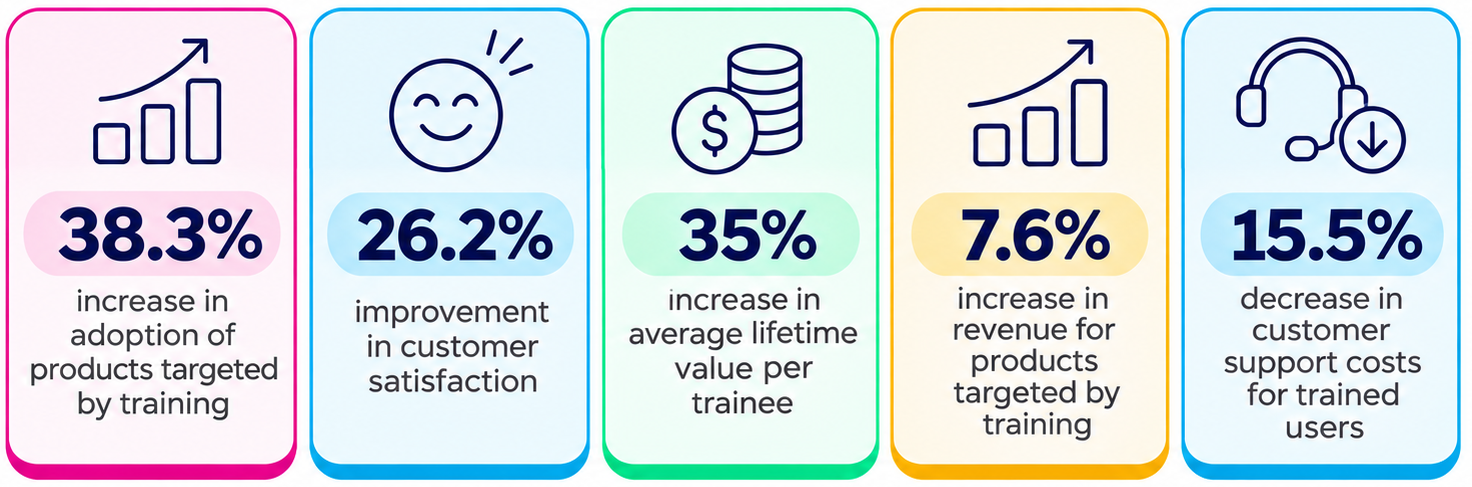
Research commissioned by Intellum and conducted by Forrester found that customer education programs were associated with a 38.3% increase in adoption of products targeted by training, a 26.2% improvement in customer satisfaction, a 35% increase in average lifetime value per trainee, a 7.6% increase in revenue for products targeted by training, and a 15.5% decrease in customer support costs for trained users.
Those numbers reflect a broader truth: customers who understand a product are more likely to use it, value it, and continue investing in it.
Product Adoption
Product adoption depends on more than access. Customers need to know what to do next.
Training can help customers move from basic usage to deeper, more confident adoption. It can show them which features matter most, how different workflows fit together, and how to apply the product to real business situations.
This is especially useful for products with multiple use cases, advanced capabilities, or role-specific workflows. Instead of overwhelming every customer with the same information, training can guide different users toward the content most relevant to them.
Retention
Retention is built through repeated proof of value. Training supports retention by helping customers continue to learn after onboarding. A customer who discovers new use cases, completes advanced modules, earns certifications, or receives targeted recommendations has more reasons to stay engaged.
In a field experiment published in Manufacturing & Service Operations Management, proactive customer education reduced first-week churn by half and reduced first-week support questions by 19.55%. The same study found that trained customers used the service 46.57% more over the following eight months.
The immediate lesson is that education can reduce early friction. The longer-term lesson is that training can help customers build habits that make the product more valuable over time.
Support Efficiency
Many support requests are not caused by product failure. They are caused by uncertainty.
Customers may not know where to find information, how to complete a workflow, which feature to use, or how to troubleshoot a basic issue. Training gives them a self-service path before they need to contact support.
That does not replace customer support. It makes support more effective. When routine questions are answered through training, support teams can spend more time on complex, high-value issues.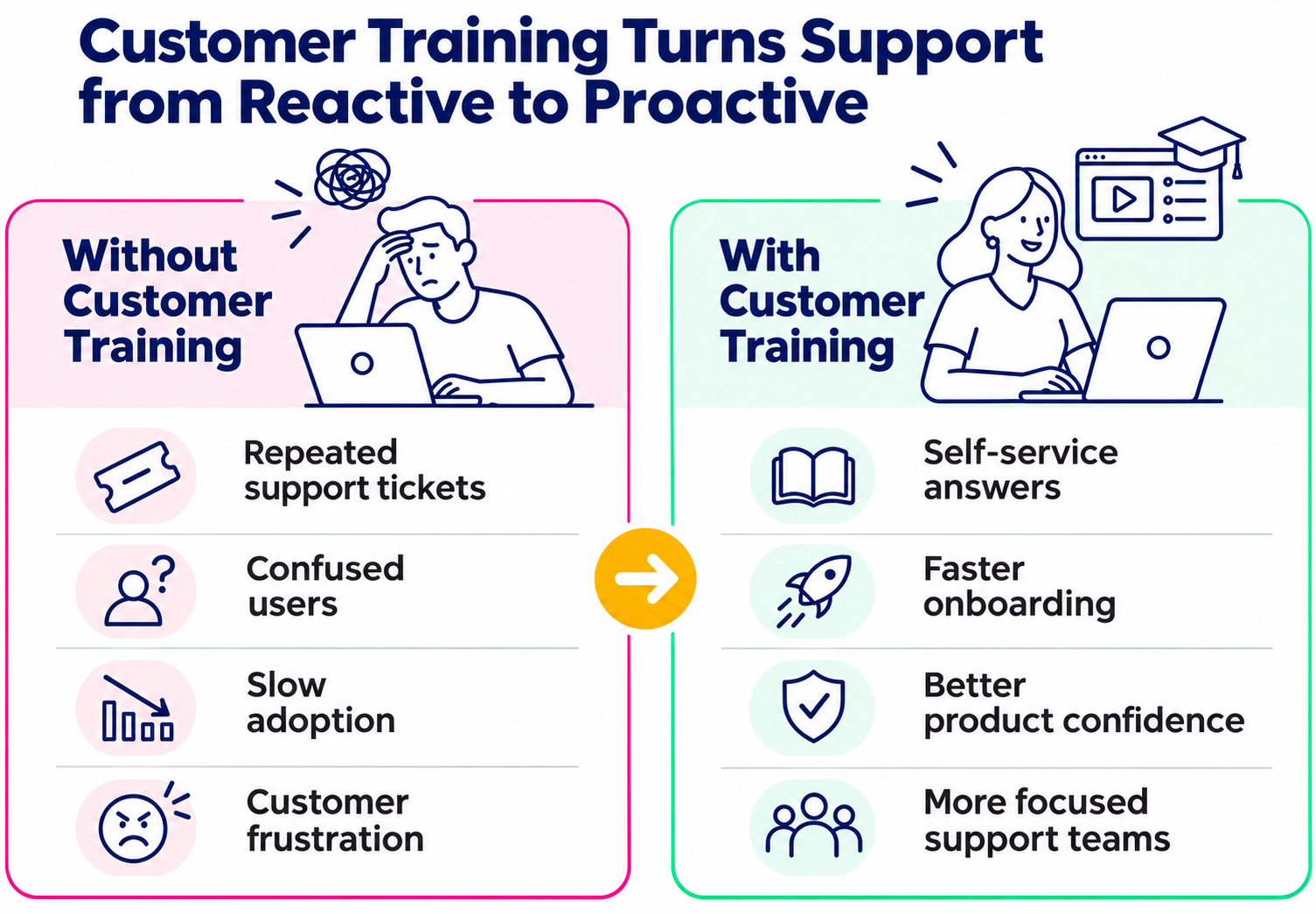
Expansion and Revenue
Customer training can also support growth. When customers understand a product more deeply, they are more likely to discover advanced features, identify additional use cases, and recognize where more services, licenses, modules, or products may help. Training data can also reveal what customers are interested in, where they are struggling, and which topics are linked to expansion opportunities.
For some organizations, customer training can even become a direct revenue stream through paid certifications, premium academies, professional education, or partner/customer learning programs.
Designing Effective Customer Training Programs
A customer training program should start with the customer’s goal, not the organization’s content library.
Many programs fail because they begin with the question, “What do we need to tell customers?” A better starting point is, “What do customers need to do successfully?”
That shift changes the structure of the program. Instead of building content around internal departments, product teams, or documentation categories, the training experience can be built around outcomes.
Start With Customer Segments
Different customers need different training.
A new customer may need onboarding and product basics. A power user may need advanced workflows. An executive sponsor may need business value, reporting, and governance information. A partner or reseller may need sales, service, and certification content. A customer administrator may need configuration and user management guidance.
Useful segmentation may include:
- Customer type
- Product or service purchased
- Role
- Region or language
- Industry
- Maturity level
- Contract stage
- Use case
- Certification status
The more complex the audience, the more important it becomes to deliver relevant learning without forcing everyone through the same experience.
Define the Learning Journey
Customer training should not be a one-time onboarding event.
A strong program usually includes several stages:
- Pre-launch or pre-implementation: Set expectations and introduce key concepts.
- Onboarding: Help customers complete essential first actions.
- Adoption: Guide customers toward frequent, confident usage.
- Optimization: Help customers improve workflows and discover deeper value.
- Expansion: Introduce advanced use cases, new products, or certifications.
- Renewal and advocacy: Reinforce value and help customers become champions.
This journey does not have to be complicated. But it should be intentional. Customers should always know what to learn next, where to find help, and how the training connects to their goals.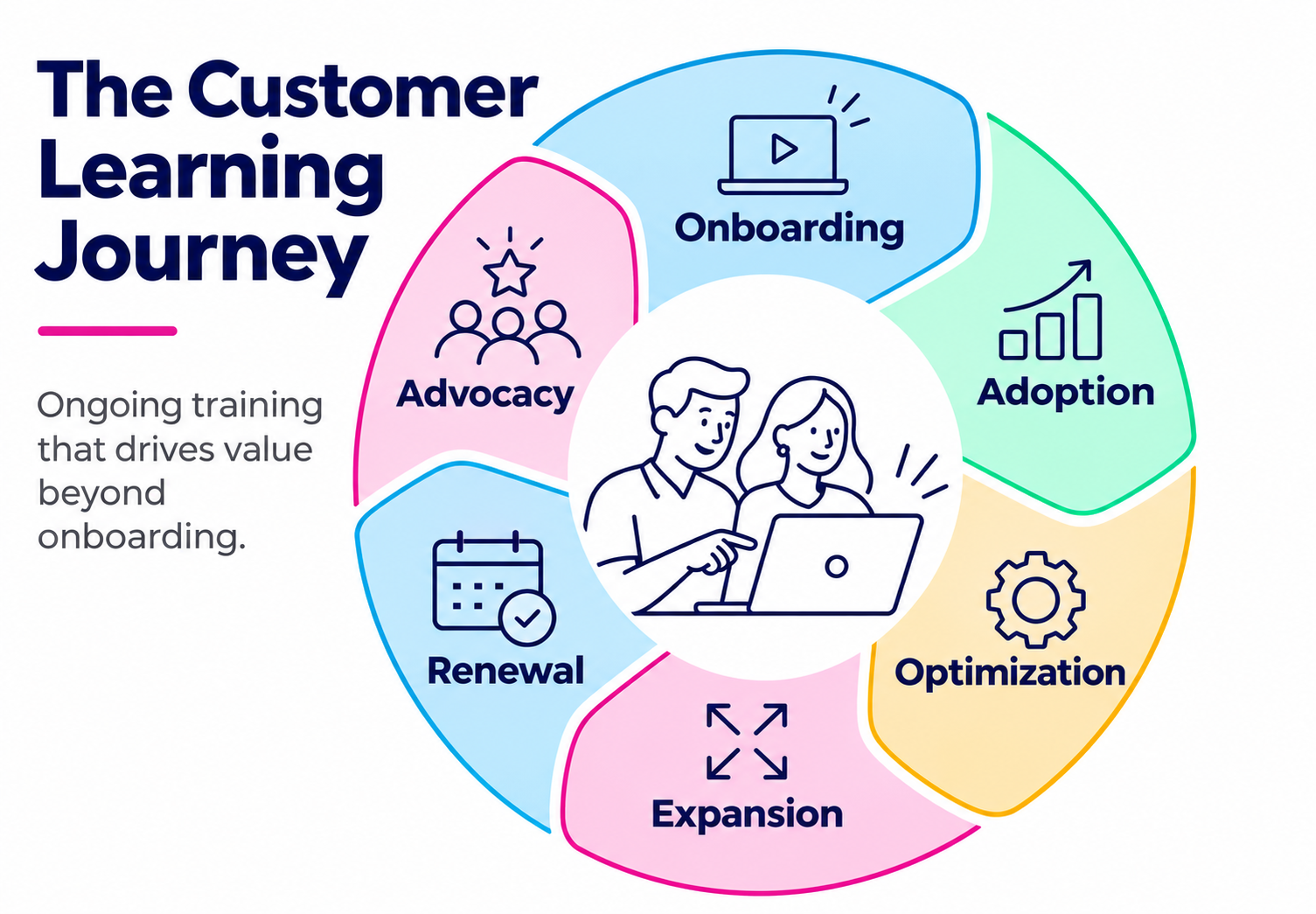
Make Training Practical
Customer training should be easy to apply.
Long, generic courses are rarely the best answer. Customers often need focused, practical resources that help them solve a specific problem or complete a specific task.
Useful formats include:
- Short product walkthroughs
- Step-by-step tutorials
- Scenario-based lessons
- Interactive simulations
- Quick reference guides
- Role-based learning paths
- Live Q&A sessions
- Certification assessments
- Troubleshooting modules
- Customer success webinars
The best format depends on the task. A complex workflow may need a guided simulation. A simple feature update may need a short video. A compliance-related process may need formal completion tracking.
Build Feedback Loops
Customer training should improve over time.
Completion data, quiz results, course ratings, search behavior, support trends, and customer feedback can all show where customers are succeeding or struggling. If many learners drop off at the same module, the content may be too long, too unclear, or poorly placed in the journey. If support tickets spike around the same topic, the training may need to be easier to find or more practical.
Training should be treated as a living part of the customer experience, not a static content repository.
Digital-First Customer Training
Digital customer training uses online platforms, mobile access, integrations, and self-service content to help customers learn when and where they need to.
This matters because customers are not always sitting at a desk. They may be using a product in the field, on a factory floor, in a retail environment, in a hospital, in a customer meeting, or while moving between locations.
Digital-first customer training should be:
- Accessible on different devices
- Easy to search
- Available at the moment of need
- Personalized where possible
- Integrated with customer workflows
- Consistent across regions and audiences
- Measurable for internal teams
The value is not simply that training is online. The value is that training becomes easier to reach, easier to update, easier to scale, and easier to connect to customer outcomes.
Mobile Access
Mobile learning is especially important for customer training because customers often need information while they are working.
A mobile-accessible learning experience can help customers review instructions, complete short modules, download resources, or check progress without waiting until they are back at a desk.
For industries with field teams, distributed users, technicians, franchisees, dealers, or frontline environments, mobile access can make the difference between training that exists and training that is actually used.
Integrated Learning
Customer training should fit into the tools customers and internal teams already use.
That may include CRM systems, customer portals, communication platforms, support tools, or collaboration environments. Integrations help reduce friction because customers do not have to search across disconnected systems to find learning content.
For internal teams, integrations can make training more useful by connecting learning data to customer records, support patterns, sales activity, and success planning.
Global and Local Delivery
Customer training programs often need to support different languages, regions, currencies, regulatory expectations, and customer segments.
A global program should provide consistency without becoming rigid. Core product training may need to stay standardized, while regional teams may need localized content, translated materials, audience-specific portals, or different learning paths.
This is where an enterprise learning platform becomes important. Customer training at scale often requires governance, permissions, reporting, localization, and administration models that simple content libraries cannot provide.
Creating Better Customer Learning Experiences
Customers judge training as part of the overall brand experience.
If training is hard to access, outdated, confusing, or irrelevant, it creates friction. If it is clear, useful, personalized, and easy to navigate, it reinforces trust.
A good customer learning experience should feel like a natural extension of the relationship customers already have with your organization.
Make It Easy to Find the Right Content
Customers should not have to guess where training lives.
A centralized learning environment helps reduce scattered resources across PDFs, knowledge bases, email attachments, help centers, recorded webinars, and support conversations. It gives customers one place to go for structured learning and gives internal teams one place to manage content, access, and reporting.
Search, filters, recommendations, learning paths, and role-based dashboards all help customers find the right content faster.
Use Interactivity Where It Adds Value
Interactivity should support learning, not distract from it.
Quizzes, simulations, scenarios, branching exercises, guided practice, and knowledge checks can make training more engaging and more effective. They also help customers confirm that they understand what they have learned, rather than passively moving through content.
With tools like ExpertusONE’s Interaction Studio, teams can build more interactive customer training experiences that include multimedia, assessments, and guided learning elements without making the experience harder to manage.
This is especially useful for complex products, technical workflows, compliance-heavy processes, or training that leads to certification.
Support Human Connection
Digital training does not have to mean impersonal training.
Live sessions, office hours, discussion forums, coaching, peer learning, and customer communities can all support engagement. Customers may still need opportunities to ask questions, share experiences, and learn from experts.
The strongest programs often combine self-service content with moments of human support.
Keep the Experience Branded and Consistent
Customer training should look and feel like part of the organization’s broader customer experience.
Branding is not just a design detail. It helps customers trust the environment they are using. A familiar experience with consistent visuals, messaging, navigation, and tone can make training feel more credible and connected to the product or service.
For organizations training customers, partners, dealers, or franchisees, branded learning portals can also help create a more professional and consistent external experience.
Essential Platform Features for Customer Training
Customer training can start small, but it becomes harder to manage as audiences, products, regions, and content libraries grow.
At scale, organizations need more than a place to upload courses. They need a platform that can support external audiences, personalized learning, analytics, integrations, commerce, and administration without creating unnecessary complexity.
Multi-Audience Support
Customer training often sits alongside employee training, partner training, compliance training, or sales enablement.
A modern enterprise learning platform should support different audiences with different permissions, branding, learning paths, reports, and administrative roles. This helps organizations manage internal and external learning without forcing every audience into the same experience.
Personalization and Recommendations
Personalization helps customers get relevant content faster.
Recommendations can be based on role, product usage, course history, learning goals, certification status, or customer segment. This reduces the burden on customers to search for what they need and reduces the risk that they are overwhelmed by a large content catalog.
ExpertusONE’s AI tools can support this by recommending content, identifying knowledge gaps, and helping administrators deliver more relevant learning experiences. The point is not to make customer training feel futuristic. The point is to make it feel useful.
Mobile and Offline Learning
Mobile access helps customers learn in the flow of work. Offline learning can also be valuable when customers work in environments with inconsistent connectivity, such as travel, field service, manufacturing, healthcare, or remote locations.
A customer training platform should make it easy for learners to start, stop, resume, and complete learning across devices.
Content Creation and Interactive Learning
Customer training teams often need to create and update content quickly.
Built-in content creation tools, interactive content players, video support, assessments, simulations, and reusable templates can help teams keep content fresh without relying on slow production cycles for every update.
This is important because customer training content must keep pace with product releases, new use cases, changing workflows, and customer feedback.
Analytics and Reporting
Training data should help teams understand what is working.
Useful metrics may include:
- Registrations
- Course starts
- Completion rates
- Assessment scores
- Certification progress
- Drop-off points
- Search behavior
- Content ratings
- Repeat visits
- Support deflection
- Product adoption signals
- Expansion or renewal influence
The most valuable reporting connects learning activity to business outcomes. This may require integration with CRM, customer success, support, or product usage systems.
CRM and Workflow Integrations
Customer training becomes more valuable when it connects to the broader customer lifecycle.
CRM integration can help sales, customer success, and account teams understand which customers are engaging with training, which topics they care about, and where they may need support. Communication integrations can help customers receive learning notifications or access training from familiar tools.
The goal is to reduce fragmentation and make learning visible where customer decisions are already being made.
eCommerce and Paid Training
Some organizations offer customer training as a paid service.
This may include certification programs, premium academies, advanced product training, continuing education, or industry-specific learning. In those cases, eCommerce capabilities can support payments, discounts, subscriptions, taxes, bulk purchases, and customer-specific pricing.
Paid training is not right for every customer education program. But when training has clear standalone value, commerce features can turn learning into a revenue-generating offer.
Current Best Practices in Customer Enablement
Customer training is changing because customer expectations are changing. Customers expect learning to be accessible, relevant, and connected to their work.
The following practices are becoming increasingly important.
Meet Customers Where They Are
Customers should not have to leave their workflow every time they need help.
Training should be available through the systems, devices, and environments customers already use. This may include mobile apps, customer portals, CRM-connected experiences, collaboration tools, knowledge bases, and embedded learning moments.
The easier training is to access, the more likely customers are to use it.
Design for Ongoing Enablement, Not One-Time Onboarding
Onboarding is only the beginning.
Customer needs change as products evolve, teams mature, and business goals shift. A strong customer enablement program continues after implementation with advanced training, refreshers, new feature education, best-practice content, and role-specific learning.
Ongoing education helps customers continue discovering value instead of plateauing after the initial rollout.
Use AI to Reduce Friction
AI can help customer training teams personalize recommendations, identify content gaps, support search, summarize resources, and reduce administrative work.
The most useful AI applications are often quiet and practical. They help customers find what they need faster and help teams manage learning more efficiently.
Connect Training to Customer Health
Training data can be an early signal of customer engagement.
Low participation, stalled progress, repeated assessment failures, or declining activity may indicate confusion, disengagement, or risk. Strong engagement, certification completion, and advanced course participation may signal readiness for expansion or advocacy.
When training data is connected to customer success workflows, it becomes more than a learning metric. It becomes a customer health signal.
Keep Content Current
Outdated customer training creates confusion.
Customer training content should be reviewed regularly, especially after product launches, interface changes, new regulations, process updates, or recurring support issues. A practical review rhythm might include scheduled content audits, release-triggered updates, and feedback-led improvements.
Make Training Measurable
Customer training should be measured by more than completion rates.
Completion matters, but it is only one indicator. Better measurement looks at whether training improves product adoption, reduces support issues, increases customer confidence, supports renewals, or contributes to expansion.
That requires learning teams to work closely with customer success, support, product, marketing, and revenue teams.
How Does ExpertusONE Support Customer Training and Enablement?
Customer training at enterprise scale is difficult when learning is spread across disconnected tools, manual processes, and audience-specific workarounds.
ExpertusONE supports customer training and enablement through a unified enterprise learning platform designed for complex internal and external audiences. Organizations can use it to deliver customer education, partner training, employee learning, certifications, and extended enterprise programs from a scalable learning environment.
For customer enablement, this means teams can support:
- Branded customer learning experiences
- Role-based and audience-specific learning paths
- Mobile and digital access
- Interactive content
- AI-supported personalization
- CRM and workplace integrations
- Reporting and analytics
- eCommerce-enabled training
- Global customer audiences
- Centralized administration and governance
The practical value is consistency. Customers get a clearer learning experience. Administrators get better control. Customer success and revenue teams get more visibility into engagement. The organization gets a more scalable way to help customers succeed.
How to Start Building a Customer Training Program?
A customer training program does not need to begin with a large academy or a complete content library. A practical starting point is to identify the moments where customers most often need help.
Ask questions such as:
- What do new customers struggle with first?
- Which questions come up repeatedly in support tickets?
- Which features are underused?
- Which workflows are most important to customer value?
- Which customers need formal certification?
- Which training topics could reduce manual onboarding work?
- Which content would help customer success teams scale their impact?
From there, build a focused learning path around one priority audience or outcome.
For example, a first customer training path might include:
- A welcome module
- A product basics course
- Three short workflow tutorials
- A troubleshooting guide
- A live Q&A session
- A short assessment or certification
- Recommended next-step modules
Once that foundation is working, the program can expand into advanced use cases, industry-specific content, role-based learning, paid training, or customer communities.
The key is to build around outcomes, measure engagement, and improve continuously.
Common Customer Training Metrics
The right metrics depend on the purpose of the program. A customer onboarding program may focus on activation and time to value. A certification program may focus on completions and assessment scores. A mature customer academy may focus on adoption, retention, expansion, and support deflection.
Useful metrics include:
- Enrollment rate
- Activation rate
- Course completion rate
- Assessment scores
- Certification achievement
- Repeat engagement
- Content ratings
- Search success
- Support ticket volume
- Product usage
- Feature adoption
- Customer satisfaction
- Renewal rate
- Expansion revenue
- Time to value
The most important metric is not always a learning metric. It is often the business outcome the learning is meant to support.
Key Takeaways
Customer training helps customers understand, adopt, and get more value from your products or services.
Strong customer enablement goes beyond onboarding by supporting customers across adoption, optimization, renewal, and expansion.
- Effective customer training can improve product adoption, reduce support friction, increase satisfaction, and support retention.
The best programs are built around customer goals, roles, use cases, and lifecycle stage rather than a generic content library.
Digital-first training makes learning easier to access, scale, update, personalize, and connect to customer workflows.
A customer training LMS should support external audiences, branded portals, mobile access, interactivity, analytics, integrations, and scalable administration.
Training data can become a useful customer health signal when connected to customer success, support, CRM, and revenue workflows.
FAQs
Customer training helps customers get value faster. It can improve product adoption, reduce support friction, increase satisfaction, support retention, and create stronger long-term relationships.
Customer education can deliver measurable ROI when it is connected to adoption, support, retention, satisfaction, and revenue outcomes. Forrester research commissioned by Intellum found that 86% of organizations reported positive ROI from customer education, while 96% at least broke even on their programs.
Yes. Customer training can reduce avoidable support requests by helping customers answer common questions, troubleshoot basic issues, and learn workflows before problems escalate. In one field experiment, proactive customer education reduced first-week support questions by 19.55%.
Customer training improves retention by helping customers understand value, build confidence, adopt the product more fully, and continue learning after onboarding. Training data can also help teams identify disengaged customers before renewal risk becomes visible elsewhere.
A customer training program may include onboarding courses, product tutorials, workflow guides, videos, live sessions, certifications, assessments, knowledge resources, best-practice content, and ongoing education for advanced users.
Yes. Some organizations monetize customer training through paid certifications, premium learning academies, advanced courses, partner education, professional development, or continuing education programs. This works best when the training has clear standalone value for the customer.
Customer training helps customers understand, adopt, and get more value from your products or services. For enterprise organizations, it is also a way to improve customer experience, reduce support friction, strengthen retention, and create more consistent engagement after the sale. This guide explains what customer training is, why it matters, how to design effective programs, and what to look for in a platform that can support customer enablement at scale.
Key Terms:
- Customer Training
- Customer Enablement
- Customer Education
- Digital Customer Training
- Customer Onboarding
- Product Adoption
- Customer Retention
- Extended Enterprise Learning
What is Customer Training?
Customer training is the process of helping customers understand how to use a product, service, platform, or solution effectively.
It can include onboarding courses, how-to tutorials, product walkthroughs, certification programs, best-practice guides, live training sessions, knowledge libraries, community learning, and ongoing education after implementation. The goal is not just to explain features. The goal is to help customers achieve outcomes.
That distinction matters. A customer can buy a product and still fail to adopt it. They can attend a kickoff call and still miss important workflows. They can receive documentation and still need help applying it in their own environment. Customer training closes that gap by giving customers structured, accessible, and repeatable ways to learn.
For many organizations, customer training is part of a broader customer enablement strategy. Customer enablement focuses on giving customers the knowledge, resources, tools, and confidence they need to succeed across the full customer lifecycle.
Why Does Customer Training Matter?
Customer experience does not end when a contract is signed or a product is delivered. In many industries, that is when the real experience begins. Customers need to understand what they have bought, how to use it, where to find support, and how to get more value over time. When that education is missing, customers are more likely to become frustrated, underuse the product, rely heavily on support, or question the value of the relationship.
Bain & Company has reported that companies that excel at customer experience grow revenues 4% to 8% above their market, largely because better experiences support loyalty, repeat purchases, and advocacy. Customer training is one practical way to improve that experience because it gives customers the confidence and clarity they need to succeed.
Strong customer training can help organizations:
- Improve product adoption
- Reduce avoidable support requests
- Shorten time to value
- Build customer confidence
- Increase retention
- Support upsell and expansion opportunities
- Create more consistent onboarding
- Turn customers into advocates
This is especially important when products are complex, technical, regulated, configurable, or business-critical. In those environments, customers rarely need a single explanation. They need an ongoing learning experience.
Customer Training vs. Customer Enablement
Customer training and customer enablement are closely related, but they are not exactly the same.
Customer training usually refers to the learning content and experiences provided to customers. This includes courses, videos, tutorials, webinars, guides, certifications, and assessments.
Customer enablement is broader. It includes training, but also the systems, resources, communication, support, and success processes that help customers achieve their goals.
In simple terms:
- Customer training teaches customers how to use, apply, or benefit from something.
- Customer enablement helps customers succeed before, during, and after that learning experience.
A good customer enablement strategy usually depends on good customer training. Without structured learning, enablement becomes reactive. Teams answer the same questions repeatedly, customer success managers become informal trainers, and customers are left to piece together information from help articles, support tickets, onboarding calls, and internal champions.
The Business Impact of Customer Training
Customer training is often treated as a support function. In reality, it can influence some of the most important commercial outcomes in the customer lifecycle.
Research commissioned by Intellum and conducted by Forrester found that customer education programs were associated with a 38.3% increase in adoption of products targeted by training, a 26.2% improvement in customer satisfaction, a 35% increase in average lifetime value per trainee, a 7.6% increase in revenue for products targeted by training, and a 15.5% decrease in customer support costs for trained users.
Those numbers reflect a broader truth: customers who understand a product are more likely to use it, value it, and continue investing in it.
Product Adoption
Product adoption depends on more than access. Customers need to know what to do next.
Training can help customers move from basic usage to deeper, more confident adoption. It can show them which features matter most, how different workflows fit together, and how to apply the product to real business situations.
This is especially useful for products with multiple use cases, advanced capabilities, or role-specific workflows. Instead of overwhelming every customer with the same information, training can guide different users toward the content most relevant to them.
Retention
Retention is built through repeated proof of value. Training supports retention by helping customers continue to learn after onboarding. A customer who discovers new use cases, completes advanced modules, earns certifications, or receives targeted recommendations has more reasons to stay engaged.
In a field experiment published in Manufacturing & Service Operations Management, proactive customer education reduced first-week churn by half and reduced first-week support questions by 19.55%. The same study found that trained customers used the service 46.57% more over the following eight months.
The immediate lesson is that education can reduce early friction. The longer-term lesson is that training can help customers build habits that make the product more valuable over time.
Support Efficiency
Many support requests are not caused by product failure. They are caused by uncertainty.
Customers may not know where to find information, how to complete a workflow, which feature to use, or how to troubleshoot a basic issue. Training gives them a self-service path before they need to contact support.
That does not replace customer support. It makes support more effective. When routine questions are answered through training, support teams can spend more time on complex, high-value issues.
Expansion and Revenue
Customer training can also support growth. When customers understand a product more deeply, they are more likely to discover advanced features, identify additional use cases, and recognize where more services, licenses, modules, or products may help. Training data can also reveal what customers are interested in, where they are struggling, and which topics are linked to expansion opportunities.
For some organizations, customer training can even become a direct revenue stream through paid certifications, premium academies, professional education, or partner/customer learning programs.
Designing Effective Customer Training Programs
A customer training program should start with the customer’s goal, not the organization’s content library.
Many programs fail because they begin with the question, “What do we need to tell customers?” A better starting point is, “What do customers need to do successfully?”
That shift changes the structure of the program. Instead of building content around internal departments, product teams, or documentation categories, the training experience can be built around outcomes.
Start With Customer Segments
Different customers need different training.
A new customer may need onboarding and product basics. A power user may need advanced workflows. An executive sponsor may need business value, reporting, and governance information. A partner or reseller may need sales, service, and certification content. A customer administrator may need configuration and user management guidance.
Useful segmentation may include:
- Customer type
- Product or service purchased
- Role
- Region or language
- Industry
- Maturity level
- Contract stage
- Use case
- Certification status
The more complex the audience, the more important it becomes to deliver relevant learning without forcing everyone through the same experience.
Define the Learning Journey
Customer training should not be a one-time onboarding event.
A strong program usually includes several stages:
- Pre-launch or pre-implementation: Set expectations and introduce key concepts.
- Onboarding: Help customers complete essential first actions.
- Adoption: Guide customers toward frequent, confident usage.
- Optimization: Help customers improve workflows and discover deeper value.
- Expansion: Introduce advanced use cases, new products, or certifications.
- Renewal and advocacy: Reinforce value and help customers become champions.
This journey does not have to be complicated. But it should be intentional. Customers should always know what to learn next, where to find help, and how the training connects to their goals.
Make Training Practical
Customer training should be easy to apply.
Long, generic courses are rarely the best answer. Customers often need focused, practical resources that help them solve a specific problem or complete a specific task.
Useful formats include:
- Short product walkthroughs
- Step-by-step tutorials
- Scenario-based lessons
- Interactive simulations
- Quick reference guides
- Role-based learning paths
- Live Q&A sessions
- Certification assessments
- Troubleshooting modules
- Customer success webinars
The best format depends on the task. A complex workflow may need a guided simulation. A simple feature update may need a short video. A compliance-related process may need formal completion tracking.
Build Feedback Loops
Customer training should improve over time.
Completion data, quiz results, course ratings, search behavior, support trends, and customer feedback can all show where customers are succeeding or struggling. If many learners drop off at the same module, the content may be too long, too unclear, or poorly placed in the journey. If support tickets spike around the same topic, the training may need to be easier to find or more practical.
Training should be treated as a living part of the customer experience, not a static content repository.
Digital-First Customer Training
Digital customer training uses online platforms, mobile access, integrations, and self-service content to help customers learn when and where they need to.
This matters because customers are not always sitting at a desk. They may be using a product in the field, on a factory floor, in a retail environment, in a hospital, in a customer meeting, or while moving between locations.
Digital-first customer training should be:
- Accessible on different devices
- Easy to search
- Available at the moment of need
- Personalized where possible
- Integrated with customer workflows
- Consistent across regions and audiences
- Measurable for internal teams
The value is not simply that training is online. The value is that training becomes easier to reach, easier to update, easier to scale, and easier to connect to customer outcomes.
Mobile Access
Mobile learning is especially important for customer training because customers often need information while they are working.
A mobile-accessible learning experience can help customers review instructions, complete short modules, download resources, or check progress without waiting until they are back at a desk.
For industries with field teams, distributed users, technicians, franchisees, dealers, or frontline environments, mobile access can make the difference between training that exists and training that is actually used.
Integrated Learning
Customer training should fit into the tools customers and internal teams already use.
That may include CRM systems, customer portals, communication platforms, support tools, or collaboration environments. Integrations help reduce friction because customers do not have to search across disconnected systems to find learning content.
For internal teams, integrations can make training more useful by connecting learning data to customer records, support patterns, sales activity, and success planning.
Global and Local Delivery
Customer training programs often need to support different languages, regions, currencies, regulatory expectations, and customer segments.
A global program should provide consistency without becoming rigid. Core product training may need to stay standardized, while regional teams may need localized content, translated materials, audience-specific portals, or different learning paths.
This is where an enterprise learning platform becomes important. Customer training at scale often requires governance, permissions, reporting, localization, and administration models that simple content libraries cannot provide.
Creating Better Customer Learning Experiences
Customers judge training as part of the overall brand experience.
If training is hard to access, outdated, confusing, or irrelevant, it creates friction. If it is clear, useful, personalized, and easy to navigate, it reinforces trust.
A good customer learning experience should feel like a natural extension of the relationship customers already have with your organization.
Make It Easy to Find the Right Content
Customers should not have to guess where training lives.
A centralized learning environment helps reduce scattered resources across PDFs, knowledge bases, email attachments, help centers, recorded webinars, and support conversations. It gives customers one place to go for structured learning and gives internal teams one place to manage content, access, and reporting.
Search, filters, recommendations, learning paths, and role-based dashboards all help customers find the right content faster.
Use Interactivity Where It Adds Value
Interactivity should support learning, not distract from it.
Quizzes, simulations, scenarios, branching exercises, guided practice, and knowledge checks can make training more engaging and more effective. They also help customers confirm that they understand what they have learned, rather than passively moving through content.
With tools like ExpertusONE’s Interaction Studio, teams can build more interactive customer training experiences that include multimedia, assessments, and guided learning elements without making the experience harder to manage.
This is especially useful for complex products, technical workflows, compliance-heavy processes, or training that leads to certification.
Support Human Connection
Digital training does not have to mean impersonal training.
Live sessions, office hours, discussion forums, coaching, peer learning, and customer communities can all support engagement. Customers may still need opportunities to ask questions, share experiences, and learn from experts.
The strongest programs often combine self-service content with moments of human support.
Keep the Experience Branded and Consistent
Customer training should look and feel like part of the organization’s broader customer experience.
Branding is not just a design detail. It helps customers trust the environment they are using. A familiar experience with consistent visuals, messaging, navigation, and tone can make training feel more credible and connected to the product or service.
For organizations training customers, partners, dealers, or franchisees, branded learning portals can also help create a more professional and consistent external experience.
Essential Platform Features for Customer Training
Customer training can start small, but it becomes harder to manage as audiences, products, regions, and content libraries grow.
At scale, organizations need more than a place to upload courses. They need a platform that can support external audiences, personalized learning, analytics, integrations, commerce, and administration without creating unnecessary complexity.
Multi-Audience Support
Customer training often sits alongside employee training, partner training, compliance training, or sales enablement.
A modern enterprise learning platform should support different audiences with different permissions, branding, learning paths, reports, and administrative roles. This helps organizations manage internal and external learning without forcing every audience into the same experience.
Personalization and Recommendations
Personalization helps customers get relevant content faster.
Recommendations can be based on role, product usage, course history, learning goals, certification status, or customer segment. This reduces the burden on customers to search for what they need and reduces the risk that they are overwhelmed by a large content catalog.
ExpertusONE’s AI tools can support this by recommending content, identifying knowledge gaps, and helping administrators deliver more relevant learning experiences. The point is not to make customer training feel futuristic. The point is to make it feel useful.
Mobile and Offline Learning
Mobile access helps customers learn in the flow of work. Offline learning can also be valuable when customers work in environments with inconsistent connectivity, such as travel, field service, manufacturing, healthcare, or remote locations.
A customer training platform should make it easy for learners to start, stop, resume, and complete learning across devices.
Content Creation and Interactive Learning
Customer training teams often need to create and update content quickly.
Built-in content creation tools, interactive content players, video support, assessments, simulations, and reusable templates can help teams keep content fresh without relying on slow production cycles for every update.
This is important because customer training content must keep pace with product releases, new use cases, changing workflows, and customer feedback.
Analytics and Reporting
Training data should help teams understand what is working.
Useful metrics may include:
- Registrations
- Course starts
- Completion rates
- Assessment scores
- Certification progress
- Drop-off points
- Search behavior
- Content ratings
- Repeat visits
- Support deflection
- Product adoption signals
- Expansion or renewal influence
The most valuable reporting connects learning activity to business outcomes. This may require integration with CRM, customer success, support, or product usage systems.
CRM and Workflow Integrations
Customer training becomes more valuable when it connects to the broader customer lifecycle.
CRM integration can help sales, customer success, and account teams understand which customers are engaging with training, which topics they care about, and where they may need support. Communication integrations can help customers receive learning notifications or access training from familiar tools.
The goal is to reduce fragmentation and make learning visible where customer decisions are already being made.
eCommerce and Paid Training
Some organizations offer customer training as a paid service.
This may include certification programs, premium academies, advanced product training, continuing education, or industry-specific learning. In those cases, eCommerce capabilities can support payments, discounts, subscriptions, taxes, bulk purchases, and customer-specific pricing.
Paid training is not right for every customer education program. But when training has clear standalone value, commerce features can turn learning into a revenue-generating offer.
Current Best Practices in Customer Enablement
Customer training is changing because customer expectations are changing. Customers expect learning to be accessible, relevant, and connected to their work.
The following practices are becoming increasingly important.
Meet Customers Where They Are
Customers should not have to leave their workflow every time they need help.
Training should be available through the systems, devices, and environments customers already use. This may include mobile apps, customer portals, CRM-connected experiences, collaboration tools, knowledge bases, and embedded learning moments.
The easier training is to access, the more likely customers are to use it.
Design for Ongoing Enablement, Not One-Time Onboarding
Onboarding is only the beginning.
Customer needs change as products evolve, teams mature, and business goals shift. A strong customer enablement program continues after implementation with advanced training, refreshers, new feature education, best-practice content, and role-specific learning.
Ongoing education helps customers continue discovering value instead of plateauing after the initial rollout.
Use AI to Reduce Friction
AI can help customer training teams personalize recommendations, identify content gaps, support search, summarize resources, and reduce administrative work.
The most useful AI applications are often quiet and practical. They help customers find what they need faster and help teams manage learning more efficiently.
Connect Training to Customer Health
Training data can be an early signal of customer engagement.
Low participation, stalled progress, repeated assessment failures, or declining activity may indicate confusion, disengagement, or risk. Strong engagement, certification completion, and advanced course participation may signal readiness for expansion or advocacy.
When training data is connected to customer success workflows, it becomes more than a learning metric. It becomes a customer health signal.
Keep Content Current
Outdated customer training creates confusion.
Customer training content should be reviewed regularly, especially after product launches, interface changes, new regulations, process updates, or recurring support issues. A practical review rhythm might include scheduled content audits, release-triggered updates, and feedback-led improvements.
Make Training Measurable
Customer training should be measured by more than completion rates.
Completion matters, but it is only one indicator. Better measurement looks at whether training improves product adoption, reduces support issues, increases customer confidence, supports renewals, or contributes to expansion.
That requires learning teams to work closely with customer success, support, product, marketing, and revenue teams.
How Does ExpertusONE Support Customer Training and Enablement?
Customer training at enterprise scale is difficult when learning is spread across disconnected tools, manual processes, and audience-specific workarounds.
ExpertusONE supports customer training and enablement through a unified enterprise learning platform designed for complex internal and external audiences. Organizations can use it to deliver customer education, partner training, employee learning, certifications, and extended enterprise programs from a scalable learning environment.
For customer enablement, this means teams can support:
- Branded customer learning experiences
- Role-based and audience-specific learning paths
- Mobile and digital access
- Interactive content
- AI-supported personalization
- CRM and workplace integrations
- Reporting and analytics
- eCommerce-enabled training
- Global customer audiences
- Centralized administration and governance
The practical value is consistency. Customers get a clearer learning experience. Administrators get better control. Customer success and revenue teams get more visibility into engagement. The organization gets a more scalable way to help customers succeed.
How to Start Building a Customer Training Program?
A customer training program does not need to begin with a large academy or a complete content library. A practical starting point is to identify the moments where customers most often need help.
Ask questions such as:
- What do new customers struggle with first?
- Which questions come up repeatedly in support tickets?
- Which features are underused?
- Which workflows are most important to customer value?
- Which customers need formal certification?
- Which training topics could reduce manual onboarding work?
- Which content would help customer success teams scale their impact?
From there, build a focused learning path around one priority audience or outcome.
For example, a first customer training path might include:
- A welcome module
- A product basics course
- Three short workflow tutorials
- A troubleshooting guide
- A live Q&A session
- A short assessment or certification
- Recommended next-step modules
Once that foundation is working, the program can expand into advanced use cases, industry-specific content, role-based learning, paid training, or customer communities.
The key is to build around outcomes, measure engagement, and improve continuously.
Common Customer Training Metrics
The right metrics depend on the purpose of the program. A customer onboarding program may focus on activation and time to value. A certification program may focus on completions and assessment scores. A mature customer academy may focus on adoption, retention, expansion, and support deflection.
Useful metrics include:
- Enrollment rate
- Activation rate
- Course completion rate
- Assessment scores
- Certification achievement
- Repeat engagement
- Content ratings
- Search success
- Support ticket volume
- Product usage
- Feature adoption
- Customer satisfaction
- Renewal rate
- Expansion revenue
- Time to value
The most important metric is not always a learning metric. It is often the business outcome the learning is meant to support.
Key Takeaways
Customer training helps customers understand, adopt, and get more value from your products or services.
Strong customer enablement goes beyond onboarding by supporting customers across adoption, optimization, renewal, and expansion.
- Effective customer training can improve product adoption, reduce support friction, increase satisfaction, and support retention.
The best programs are built around customer goals, roles, use cases, and lifecycle stage rather than a generic content library.
Digital-first training makes learning easier to access, scale, update, personalize, and connect to customer workflows.
A customer training LMS should support external audiences, branded portals, mobile access, interactivity, analytics, integrations, and scalable administration.
Training data can become a useful customer health signal when connected to customer success, support, CRM, and revenue workflows.
FAQs
Customer training helps customers get value faster. It can improve product adoption, reduce support friction, increase satisfaction, support retention, and create stronger long-term relationships.
Customer education can deliver measurable ROI when it is connected to adoption, support, retention, satisfaction, and revenue outcomes. Forrester research commissioned by Intellum found that 86% of organizations reported positive ROI from customer education, while 96% at least broke even on their programs.
Yes. Customer training can reduce avoidable support requests by helping customers answer common questions, troubleshoot basic issues, and learn workflows before problems escalate. In one field experiment, proactive customer education reduced first-week support questions by 19.55%.
Customer training improves retention by helping customers understand value, build confidence, adopt the product more fully, and continue learning after onboarding. Training data can also help teams identify disengaged customers before renewal risk becomes visible elsewhere.
A customer training program may include onboarding courses, product tutorials, workflow guides, videos, live sessions, certifications, assessments, knowledge resources, best-practice content, and ongoing education for advanced users.
Yes. Some organizations monetize customer training through paid certifications, premium learning academies, advanced courses, partner education, professional development, or continuing education programs. This works best when the training has clear standalone value for the customer.


