
How to Build LMS RFP Requirements Without Losing Your Mind (Even When It Feels Like Herding Cats)
A practical guide for organizations selecting their next Learning Management System
By Gordon Johnson and Sebastian Rozenveld

Summary
This practical guide explains how to build LMS RFP requirements without the chaos that derails so many LMS selection projects. It explores the common mistakes organizations make during requirements gathering and why stakeholder alignment is often so difficult. You’ll also learn how to create a more focused, structured process that leads to better LMS decisions and fewer regrets later.
There’s a moment, early in most LMS selection projects, when someone says, “Let’s just gather requirements.”
It sounds reasonable. Responsible, even. And then the invites go out. HR joins. Other departments join. IT joins. Compliance joins. Someone from sales shows up. Someone else brings a spreadsheet. Another person forwards an email thread that started three months ago.
By week two, the document is 14 pages long. By week four, it’s 42. By week six, no one is quite sure what problem you’re solving anymore.
This is the part no one warns you about. Selecting an LMS is not a technology problem. It’s a coordination problem. Or, to borrow from a certain group of fictional cowboys, it’s herding cats.
And not the polite, domesticated kind. The half-wild, dart-in-every-direction, scratch-you-on-the-way-out kind.
According to Gartner, 60% of enterprise software buyers regret their purchase within 12–18 months. Not because the product didn’t work, but because the requirements never really did.
This guide is designed to help you do something deceptively difficult: Bring the herd into town … and not lose half of it along the way.
Why This Feels So Hard (It’s Not You)

Most enterprise software solves a specific problem. An LMS solves… several.
- HR sees onboarding
- Compliance sees audit risk
- Sales sees enablement
- IT sees integrations
- Executives see ROI
- Learners see … something they hope they don’t have to log into too often
Everyone is right. That’s the problem.
In most LMS decisions, you’re not just defining requirements. You’re bringing together a group of people who each see the system differently, each has valid concerns, and each is optimizing for something else.
What you’re really managing isn’t a requirements process. It’s a temporary coalition of stakeholders who don’t naturally agree on anything, trying to define a shared future system.
If that feels chaotic, it’s because it is.
Where Requirements Go Off the Rails
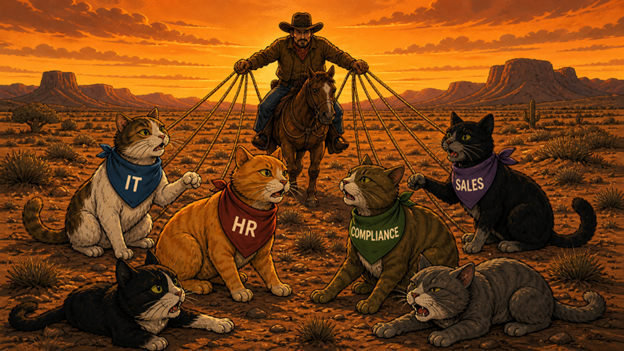
Requirements gathering rarely fails dramatically. It drifts. Slowly. Quietly. Until the document no longer reflects reality.
Here’s how it usually happens.
1. The Wish List Problem
You ask what people need. They tell you everything they’ve ever wanted. Gamification. AI. Dashboards. Mobile apps. Offline access in remote regions that no one currently operates in.
Individually, each request makes sense. Collectively, they describe a system that does not exist.
2. The Edge Case Trap
Someone raises a scenario that happens once a year. It’s valid. It matters. And suddenly, the entire evaluation begins to orbit around it.
You start designing for the exception instead of the rule.
3. The Alignment Illusion
Everyone participates. Meetings happen. Notes are taken.
It feels aligned. Until decisions need to be made.
McKinsey has found that organizations that engage stakeholders early are significantly more likely to succeed.
But participation is not alignment. Alignment is when people agree on what matters most.

4. Features Masquerading as Needs
People ask for tools. What they actually need are outcomes.
- Faster onboarding
- Fewer compliance gaps
- Less administrative friction
The feature is just the means.
5. The Quiet Cost of Poor Requirements
Poor requirements are one of the most common reasons projects struggle or fail. Not because teams don’t care. Because they underestimate how hard this part is.
The Mistakes That Come Back Later
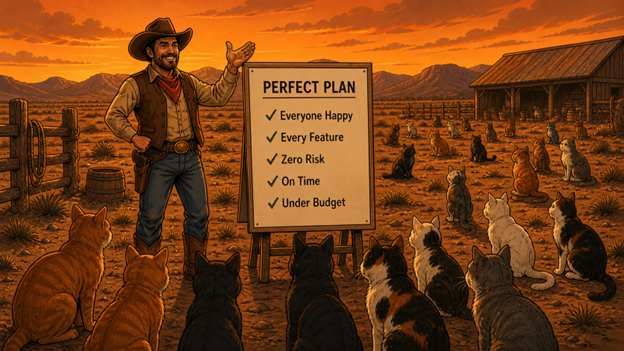
Common Mistakes: Looks good on paper. Reality … not so much.
Most LMS regrets don’t show up during selection. They show up six months after launch. And when you trace them back, they usually point here.
Mistake 1: Starting With Demos
Demos feel like progress. They’re not. They’re “theater”.
John Leh puts it simply: “Successful LMS buyers know better. They realize they must define their requirements first.”
Watch enough demos early, and your requirements start to mirror what you’ve seen. Not what you actually need.
Mistake 2: Trying to Make Everyone Happy
There’s a moment when the team realizes: Not everyone is going to get what they want.
This is where many projects slow down. Or stall. Or quietly expand the scope to avoid the conversation.

Mistake 3: Too Much of a Good Thing
More requirements feel safer. It’s not.
The more you add, the harder it becomes to see what actually matters. RFPs get longer, responses get heavier, and the process takes longer. Clarity beats completeness every time.
Mistake 4: Forgetting the Learner
It’s surprisingly easy to design an LMS that works beautifully for administrators and poorly for everyone else.
eLearning Industry data consistently shows user experience as a top driver of dissatisfaction.
A Framework That Brings Order to the Chaos
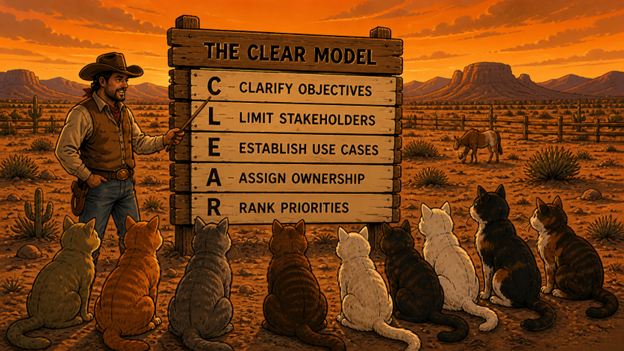
The Framework: A good plan doesn’t control the cats. It gives them a direction.
When things feel chaotic, structure helps. No more discussion. Structure.
The CLEAR Model
C — Clarify Objectives
Start with outcomes. If you can’t explain what success looks like, requirements won’t fix that.
L — Limit Stakeholders
Not everyone needs to be in every conversation. A smaller, focused group moves faster and decides more clearly.
E — Establish Use Cases
Real workflows beat hypothetical scenarios. If it doesn’t happen often, it shouldn’t drive the decision.
A — Assign Ownership
Every requirement needs someone accountable. Otherwise, it belongs to everyone, which means no one.
R — Rank Priorities
Must Have. Should Have. Nice to Have. This is where the real work happens. And where most teams hesitate.
Practical Tools That Actually Help
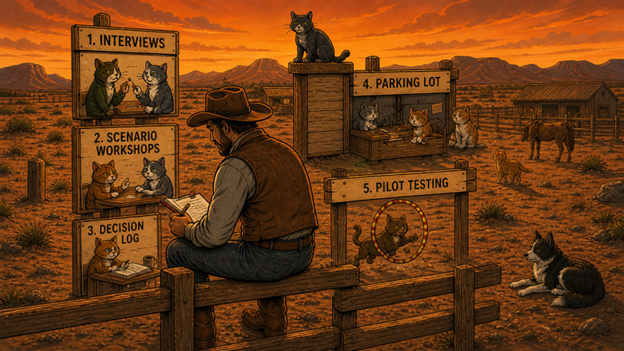
Tools & Techniques: Better tools. Better insights. Fewer surprises later.
This is where things get easier. Not effortless. But manageable.
1. Interviews Over Surveys
Surveys collect answers. Interviews uncover thinking. Ask: “What problem are you trying to solve?” Then keep asking why.
2. Scenario Workshops
Instead of listing features, walk through real situations. “How does onboarding actually happen today?” This is where the useful detail shows up.
3. The Decision Log
Write things down. Not just the requirement. The decision behind it. The future you will be grateful.

4. The Parking Lot
Not every idea belongs in this phase. But every idea should be acknowledged. This keeps conversations moving.
5. Pilot Testing
Demos are controlled environments. Real users are not. A pilot reveals what demos don’t.
What People Who’ve Been Through This Say

“I’ve seen organizations list 80 must-have features, which just tells vendors you haven’t done your homework. Keep your must-haves to 10 to 15 core requirements.”
— ProProfs Training Blog
“The three major reasons a project will succeed are user involvement, executive management support, and a clear statement of requirements. Without them, the chances of success are greatly diminished.”
— The Standish Group, CHAOS Report
“Successful LMS buyers know better. They realize they must define their requirements first. Talking with software providers before clarifying requirements creates confusion, wastes time, and triggers a flood of follow-up activity.”
— John Leh, CEO and Lead Analyst, Talented Learning
“Projects with clear requirements documented before development started were 97% more likely to succeed.”
— Dr. Junade Ali, author of Impact Engineering, citing research from a study of 600 software engineers (The Register, June 2024)
“With more than 1,000 learning systems available today, it’s easy to become a victim of Parkinson’s Law, where work expands to fill the time available for its completion.”
— John Leh, CEO & Lead Analyst, Talented Learning (2025)
“Avoid vague language like ‘user-friendly’ or ‘intuitive interface.’ Instead, use concrete, testable criteria. For example: ‘The system must support 5,000 concurrent users without page load times exceeding 3 seconds’.”
— ProProfs Training Blog
“The danger of selecting the incorrect solution is decreased by working with the appropriate stakeholders from the beginning and continuing to involve them throughout the implementation project.”
— Olive Technologies
“Most LMS failures come from internal misalignment, not vendor limitations. The RFP should reflect shared priorities, not one department’s wishlist.”
— ProProfs Training Blog
The pattern in these observations is consistent: organizations that invest in clear, structured requirements make better decisions. Those who rush, improvise, or skip structure almost always end up in a replacement cycle.
The Brandon Hall Group research adds a sobering note: satisfaction scores across 17 LMS factors rarely exceeded 3.5 out of 5. The chronic dissatisfaction isn’t purely a product problem. It’s a mismatch problem, and the mismatch starts with requirements.
Before You Open the Gate

Before you issue an RFP. Pause. Check. Align. Then open the gate.
Before issuing an RFP, pause and ask:
- Do we understand our core workflows?
- Do we know what’s non-negotiable?
- Are we aligned on priorities?
- Do we know what success looks like?
If the answer is “not quite,” don’t open the gate yet.
Bringing the Herd Into Town
The goal isn’t perfection. It’s control.
If you:
- Focus on outcomes
- Prioritize clearly
- Align stakeholders
- Test real scenarios
You can do something surprisingly rare. You can bring the herd into town … and not lose a single one.
And if you’ve ever tried to herd cats, you know that’s no small thing.

Takeaways That Will Save You From Regret
1. Requirements gathering is where most LMS decisions fail. Not vendor selection.
The Gartner research is detailed: 60% of software buyers experience regret within 18 months, and the causes almost always trace back to planning failures, not product failures. Fix the process, and you dramatically improve the outcome.
2. Structure your stakeholder engagement.
Don’t invite everyone to one meeting and call it requirements gathering. Run targeted sessions by functional group, use structured templates, set hard deadlines, and validate with real users. Inclusive does not have to mean inefficient.
3. Use cases, not feature lists.
Your vendor evaluation should be built around specific scenarios your organization actually needs to execute. If a vendor can’t demo your use cases convincingly, they won’t perform them reliably after implementation either.
4. Don’t rush the timeline.
Allocate 6–12 months. Rushed decisions produce regret. The cost of taking three extra months to get requirements right is a fraction of the cost of a failed implementation or a premature replacement cycle.
5. Plan for three to five years, not just today.
The LMS you choose should be able to grow with your organization. Requirements that only reflect current needs are requirements that will break within 24 months.
FAQs
About the Authors:
Gordon Johnson
Gordon Johnson is the Chief Engagement and Growth Officer at ExpertusONE with deep experience helping customers boost product engagement and leading go-to-market strategy for enterprise software companies. He focuses on connecting product innovation to strong market positioning, helping learning platforms stand out in competitive categories. Gordon brings an executive perspective to thought leadership, buyer behavior, and how enterprise learning technology is evolving.
Sebastian Rozenveld
Sebastian Rozenveld is the Growth Marketing Manager at ExpertusONE and is focused on positioning enterprise learning platforms for modern buyers. He works across marketing, sales, and product to turn complex LMS capabilities into clear, credible narratives that drive demand and discovery. His work centers on data-driven growth, market education, and ensuring learning platforms show up where buyers and AI systems actually look.


