
BLOG
The Complete Guide to Employee Onboarding Training: Strategy, LMS, and Best Practices
 Author: Ferik Ferizaj
BLOG
The Complete Guide to Employee Onboarding Training: Strategy, LMS and Best Practices
Author: Ferik Ferizaj
Employee onboarding training gives new hires the knowledge, tools, support, and context they need to become confident and productive in a new role. But onboarding is no longer just a first-day orientation or a set of HR documents. For modern organizations, especially those with distributed teams, complex systems, and role-specific training needs, onboarding must be structured, consistent, and easy to access. A strong onboarding training program combines clear learning paths, digital access, manager visibility, connection, compliance, and ongoing development. The right LMS can help organizations deliver that experience at scale.
Key Terms:
- Employee Onboarding Training
- Onboarding Training Program
- New Hire
- Remote Onboarding
- Hybrid Onboarding
- Onboarding LMS
- Role-based Learning
What is Employee Onboarding Training?
Employee onboarding training is the structured process of helping new hires understand the company, their role, the tools they will use, the policies they need to follow, and the expectations they need to meet.
It may include company orientation, culture training, compliance courses, systems training, role-specific learning, product knowledge, team introductions, manager check-ins, and longer-term development planning.
Onboarding can happen in person, online or through a hybrid model. In many organizations, it begins before the employee’s first day through preboarding, then continues through the first few weeks or months as the employee builds confidence and capability.
The key point is that onboarding training should not be treated as a single event. Orientation may happen on day one. Onboarding should support the full transition into the role.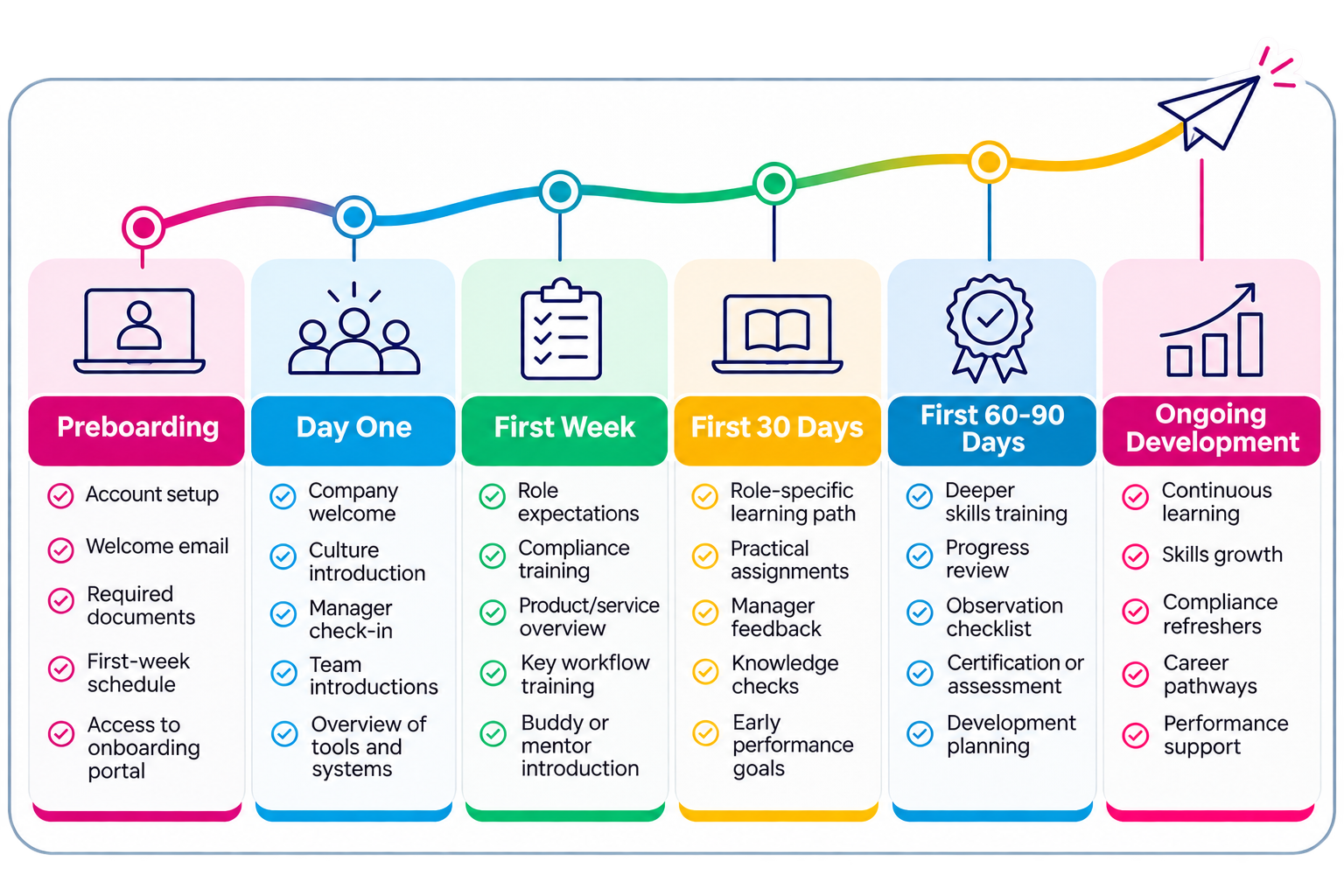
Why Does Onboarding Training Matter?
A new hire’s early experience shapes how quickly they understand the business, how confident they feel in their role, and how connected they feel to the organization.
When onboarding is weak, employees are left to search for answers on their own. They may not know which tools to use, which policies apply, who to ask for help, or what success looks like in their role. That slows productivity and creates unnecessary stress for both the employee and their manager. The problem is common. Gallup found that only 12% of employees strongly agree that their organization does a great job onboarding new employees.
For enterprise organizations, the challenge is even greater. Onboarding often needs to work across different departments, regions, job roles, compliance requirements, and work environments. A process that works for one team may not work for another. A manager-led checklist may be fine for a small group, but it becomes harder to scale when hiring volumes grow, or teams become more distributed.
- Effective onboarding training helps organizations:
- Set clear expectations from the start
- Reduce confusion and repetitive questions
- Improve early productivity
- Support compliance and policy understanding
- Build employee confidence and connection
- Give managers better visibility into progress
- Create a stronger foundation for long-term development
What Should an Onboarding Training Program Include?
A strong onboarding training program should give new hires the information they need without overwhelming them. It should also make it clear what is required, what is role-specific, and what can be revisited later.
Common elements include:
- Preboarding and administration: Before day one, new hires may need access to systems, key documents, introductory resources, and basic company information. Preboarding helps remove friction so the first few days can focus on learning, connection, and role readiness.
- Company culture, mission, and values: New employees need to understand what the organization does, how it works, and what it values. This can include company history, leadership messages, team structure, customer context, and cultural expectations.
- Role expectations and team structure: Onboarding should clarify what the employee is responsible for, who they will work with, how their role supports the wider organization, and what success looks like.
- Tools, systems and workflows: New hires need practical guidance on the platforms, processes and communication channels they will use every day. This is especially important in digital and hybrid workplaces where employees may not be able to rely on informal desk-side support.
- Policies, compliance and required training: Many onboarding programs include required training on safety, security, data privacy, workplace conduct, harassment prevention, industry regulations, or internal policies.
- Role-specific learning: Beyond general orientation, employees need training that reflects their actual responsibilities. A sales hire, support agent, engineer, manager, and field employee will each need a different path.
- Manager check-ins and feedback: Managers play a critical role in helping new hires apply what they learn. Onboarding should include structured check-ins, opportunities to ask questions, and ways to identify where more support is needed.
- Ongoing development: Onboarding should be the first stage of the employee learning journey, not the end of it. Once new hires understand the basics, they should have a path into skill development, career growth, and continuous learning.
Modern Onboarding Starts With Connection, Not Paperwork
Many onboarding programs focus heavily on information transfer. New hires receive handbooks, policy documents, slide decks, and system instructions. Those materials matter, but they are not enough.
Employees also need to feel connected. They need to know where they fit, who they can turn to, how their work contributes to the organization, and how to navigate the culture. McKinsey research on employee attrition found that more than half of employees who left a job in the previous six months did not feel valued by their organization or manager, or lacked a sense of belonging. Onboarding is one of the earliest opportunities to address that risk.
Modern onboarding should therefore combine content with connection. That can include:
- Welcome messages and leadership introductions
- Team and peer introductions
- Mentoring or buddy programs
- Discussion forums or group activities
- Manager-led check-ins
- Interactive content and knowledge checks
- Clear access to support resources
Digital onboarding can make this easier when it is designed well. Instead of forcing employees to search across emails, shared drives, HR systems, and disconnected tools, organizations can create one guided experience that brings learning, resources, tasks, and support together.
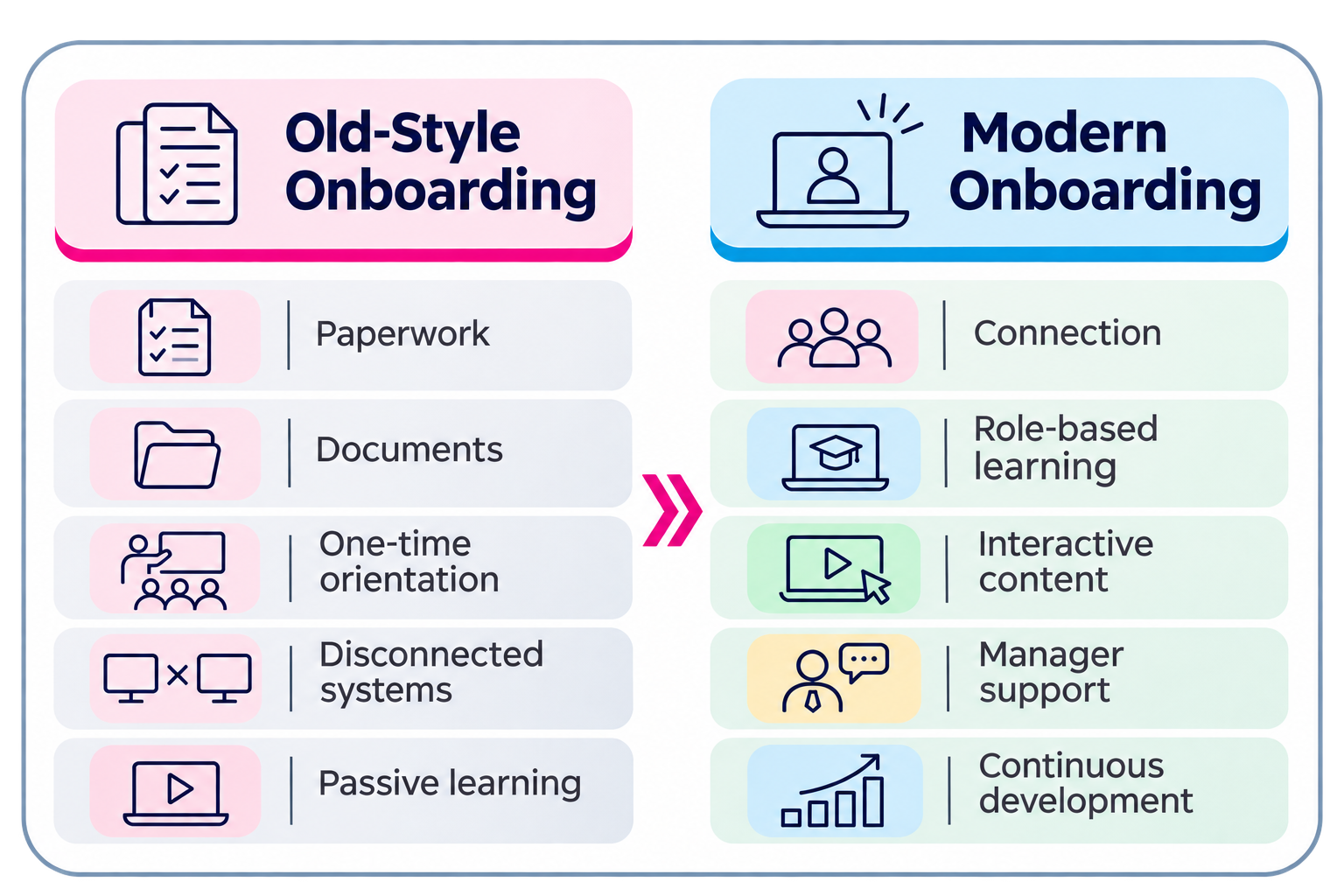
The goal is not to replace human connection with technology. The goal is to use technology to make connection easier, more consistent, and more visible.
Remote and Hybrid Onboarding Needs More Structure
Remote and hybrid work make onboarding more flexible, but they also remove many of the informal signals that help new employees settle in.
In an office, a manager might notice when someone looks unsure. A colleague might answer a quick question after a meeting. A new hire might learn communication norms simply by watching how the team works.
In remote environments, those moments are less automatic. New employees may be unsure where to ask questions, how to find information, or whether they are progressing at the right pace. Managers may also find it harder to assess readiness when they cannot rely on informal observation. That is why remote and hybrid onboarding needs more structure, not less.
- A strong remote onboarding program should provide:
- A clear learning path for the first days, weeks, and months
- Easy access to required training and reference materials
- Guidance on communication norms and collaboration tools
- Scheduled check-ins with managers and peers
- Visibility into what has been completed and what is still outstanding
- Opportunities for interaction, feedback, and support
- For hybrid teams, consistency is especially important. Employees should receive the same quality of onboarding whether they work in an office, from home, in the field, or across multiple locations.
How Does an LMS Support Employee Onboarding?
A learning management system helps organizations turn onboarding from a loose collection of tasks into a structured, trackable learning experience.
For new hires, an LMS can provide one place to access courses, videos, documents, quizzes, live sessions, policies, and resources. For managers and administrators, it can provide visibility into progress, completion, performance, and gaps.
The most useful LMS onboarding capabilities include:
- Centralized onboarding content: Instead of spreading resources across multiple systems, organizations can house onboarding courses, documents, videos, assessments, and surveys in one place. This makes the experience easier for employees and easier to manage for administrators.
- Role-based learning paths: Not every employee needs the same onboarding journey. An LMS can assign training based on role, department, location, audience, compliance requirement, or learning need.
- Learning in the flow of work: Employees should not always have to leave their everyday tools to find learning. LMS integrations with platforms such as Microsoft Teams, Slack, or Salesforce can help bring onboarding content closer to where work already happens.
- Blended learning options: Effective onboarding often includes a mix of self-paced courses, live sessions, manager conversations, videos, knowledge checks, and practical activities. A modern LMS can support multiple formats in one program.
- Interactive learning and knowledge checks: Quizzes, scenarios, short modules, feedback loops, and interactive content help employees engage with material rather than passively consume it. This is especially useful for complex workflows, compliance-heavy topics, or role-specific skills.
- Manager visibility and automated follow-up: Managers need to know whether employees are completing required learning, where they may be struggling, and when follow-up is needed. Automated reminders, progress tracking, and reporting reduce manual chasing.
- Mobile and flexible access: New hires may not always be at a desk. Mobile access helps employees complete training and revisit resources when and where they need them.
- Reporting and analytics: Onboarding data helps organizations understand what is working. Completion rates, assessment results, overdue training, engagement patterns, and learner feedback can all point to opportunities for improvement.
Key LMS Features for Onboarding
When evaluating LMS support for onboarding, it helps to focus on capabilities that improve both the new hire experience and administrative control. The best onboarding systems make training easier for employees to follow and easier for organizations to govern.
Learning Paths
Learning paths guide employees through each stage of onboarding, from preboarding and orientation to role-specific training and ongoing development. They give new hires a clear sequence to follow, so they know what to complete, when to complete it, and where to go next.
Automated Assignments
Automated assignments help reduce manual administration by assigning training based on role, team, location, department, or compliance requirement. This is especially useful for larger organizations where onboarding needs to vary by audience without becoming difficult to manage.
HR and Workplace Tool Integrations
Onboarding works better when learning connects with the systems employees and administrators already use. Integrations with HR systems, Microsoft Teams, Slack, Salesforce, or other workplace tools can make training easier to launch, access, and track.
Interactive Content
Interactive content helps new hires engage with information rather than simply read or watch it. Short modules, quizzes, scenarios, knowledge checks, and feedback prompts can support better understanding, especially for complex tools, workflows, or compliance topics.
Mobile Access
Mobile access gives employees more flexibility to complete onboarding and revisit resources when they need them. This is particularly valuable for hybrid, remote, frontline, or field-based employees who may not always be working from a desk.
Live Session Support
Some onboarding moments are best delivered live. An LMS should support instructor-led sessions, virtual meetings, webinars, or blended learning events so organizations can combine self-paced learning with real-time discussion and interaction.
Observation Checklists and Manager Validation
Not every onboarding requirement can be measured by course completion alone. Observation checklists and manager validation help confirm that employees can apply what they have learned in real work settings.
Notifications and Reminders
Automated notifications help keep onboarding on track without constant manual follow-up. They can remind employees about upcoming tasks, alert managers to incomplete training, and reduce the risk of missed requirements.
Manager and Administrator Dashboards
Dashboards give managers and administrators a clear view of onboarding progress. They make it easier to see who is on track, who needs support, and where bottlenecks are appearing across teams or locations.
Reporting and Analytics
Reporting helps organizations understand whether onboarding is working. Completion data, assessment results, compliance status, engagement patterns, and learner feedback can all help improve the program over time.
AI-Assisted Recommendations
AI-assisted recommendations can make onboarding more relevant by suggesting content based on role, skills, learning history, or development needs. The value is not in adding complexity, but in helping employees find useful learning faster.
Onboarding should feel personal to the new hire, but it also needs to be consistent enough to scale. The right LMS features help organizations balance both needs.
Best Practices for Building an Onboarding Training Program
A good onboarding program does not need to be complicated. It does need to be intentional.
Start with the outcomes. What should a new hire know, do, and feel by the end of their first day, first week, first month, and first quarter? From there, build a learning path that supports those milestones.
A few best practices can help:
- Start before day one: Use preboarding to complete basic administration, share essential information, and help new hires feel prepared.
- Separate universal and role-specific onboarding: Everyone may need company, culture, and policy training. Role-specific learning should then reflect the employee’s actual responsibilities.
- Make the path clear: New hires should know what to complete, when to complete it, and where to go next. A clear sequence reduces uncertainty.
- Include human touchpoints: Digital onboarding should still include manager conversations, peer introductions, mentoring, and feedback.
- Use interaction where it adds value: Interactive content, quizzes, and scenarios can help reinforce important concepts, especially where employees need to apply knowledge.
- Make resources easy to revisit: Onboarding materials should remain available after the first few weeks. New hires often need to return to information once they start applying it in real work.
- Track progress and improve over time: Use reporting to identify where employees fall behind, where content is unclear, and which parts of the program need refinement.
- Connect onboarding to ongoing learning: Once onboarding ends, development should continue. A strong onboarding program should lead naturally into skills development, compliance refreshers, career pathways, and performance support.
How Does ExpertusONE Help?
ExpertusONE helps organizations turn onboarding into a structured, measurable learning experience. Instead of relying on disconnected documents, manual follow-ups, or one-size-fits-all training, teams can build guided onboarding paths that reflect each employee’s role, location, and requirements.
New hires get a clearer experience, with relevant training, resources, interactive content, and support available from one place. Managers and administrators get the visibility they need to monitor progress, identify gaps, and keep onboarding moving without constant manual tracking.
For organizations with complex onboarding needs, ExpertusONE also connects onboarding to the wider learning ecosystem. That includes employee training, compliance training, learning in the flow of work, content creation, reporting, integrations, and long-term skills development.
Explore the ExpertusONE onboarding training solution to learn how the platform supports scalable, connected new hire onboarding.
Key Takeaways
- Employee onboarding training should be a structured learning journey, not a one-day orientation or paperwork exercise.
- Strong onboarding helps new hires understand the company, their role, required tools, policies, expectations, and where to get support.
- Modern onboarding needs to build connection as well as deliver information, especially for remote and hybrid employees.
- A scalable onboarding program should combine universal company training with role-specific learning paths.
- An LMS can make onboarding easier to manage by centralizing content, automating assignments, tracking progress, and giving managers better visibility.
- Interactive content, mobile access, workplace tool integrations, and automated reminders can help keep new hires engaged and on track.
- Onboarding should connect naturally to ongoing development, compliance training, skills growth, and long-term employee performance.
FAQs
Onboarding training should include preboarding, company culture, role expectations, policies, compliance requirements, tools and systems, team introductions, role-specific learning, manager support, and a path to ongoing development.
Onboarding should last longer than the first day or first week. Many organizations structure onboarding across the first 30, 60, and 90 days, with continued learning after the employee has settled into the role.
An LMS improves onboarding by centralizing training content, assigning learning by role or requirement, tracking progress, supporting different learning formats, and giving managers visibility into completion and performance.
Remote onboarding works best when employees have a clear learning path, easy access to resources, scheduled check-ins, opportunities to connect with colleagues, and digital tools that help managers track progress.
Common onboarding metrics include training completion, time to productivity, assessment results, compliance completion, manager check-in completion, new hire satisfaction, early retention, and engagement with onboarding resources.
Employee onboarding training gives new hires the knowledge, tools, support, and context they need to become confident and productive in a new role. But onboarding is no longer just a first-day orientation or a set of HR documents. For modern organizations, especially those with distributed teams, complex systems, and role-specific training needs, onboarding must be structured, consistent, and easy to access. A strong onboarding training program combines clear learning paths, digital access, manager visibility, connection, compliance, and ongoing development. The right LMS can help organizations deliver that experience at scale.
Key Terms:
- Employee Onboarding Training
- Onboarding Training Program
- New Hire
- Remote Onboarding
- Hybrid Onboarding
- Onboarding LMS
- Role-based Learning
What is Employee Onboarding Training?
Employee onboarding training is the structured process of helping new hires understand the company, their role, the tools they will use, the policies they need to follow, and the expectations they need to meet.
It may include company orientation, culture training, compliance courses, systems training, role-specific learning, product knowledge, team introductions, manager check-ins, and longer-term development planning.
Onboarding can happen in person, online or through a hybrid model. In many organizations, it begins before the employee’s first day through preboarding, then continues through the first few weeks or months as the employee builds confidence and capability.
The key point is that onboarding training should not be treated as a single event. Orientation may happen on day one. Onboarding should support the full transition into the role.
Why Does Onboarding Training Matter?
A new hire’s early experience shapes how quickly they understand the business, how confident they feel in their role, and how connected they feel to the organization.
When onboarding is weak, employees are left to search for answers on their own. They may not know which tools to use, which policies apply, who to ask for help, or what success looks like in their role. That slows productivity and creates unnecessary stress for both the employee and their manager. The problem is common. Gallup found that only 12% of employees strongly agree that their organization does a great job onboarding new employees.
For enterprise organizations, the challenge is even greater. Onboarding often needs to work across different departments, regions, job roles, compliance requirements, and work environments. A process that works for one team may not work for another. A manager-led checklist may be fine for a small group, but it becomes harder to scale when hiring volumes grow, or teams become more distributed.
- Effective onboarding training helps organizations:
- Set clear expectations from the start
- Reduce confusion and repetitive questions
- Improve early productivity
- Support compliance and policy understanding
- Build employee confidence and connection
- Give managers better visibility into progress
- Create a stronger foundation for long-term development
What Should an Onboarding Training Program Include?
A strong onboarding training program should give new hires the information they need without overwhelming them. It should also make it clear what is required, what is role-specific, and what can be revisited later.
Common elements include:
- Preboarding and administration: Before day one, new hires may need access to systems, key documents, introductory resources, and basic company information. Preboarding helps remove friction so the first few days can focus on learning, connection, and role readiness.
- Company culture, mission, and values: New employees need to understand what the organization does, how it works, and what it values. This can include company history, leadership messages, team structure, customer context, and cultural expectations.
- Role expectations and team structure: Onboarding should clarify what the employee is responsible for, who they will work with, how their role supports the wider organization, and what success looks like.
- Tools, systems and workflows: New hires need practical guidance on the platforms, processes and communication channels they will use every day. This is especially important in digital and hybrid workplaces where employees may not be able to rely on informal desk-side support.
- Policies, compliance and required training: Many onboarding programs include required training on safety, security, data privacy, workplace conduct, harassment prevention, industry regulations, or internal policies.
- Role-specific learning: Beyond general orientation, employees need training that reflects their actual responsibilities. A sales hire, support agent, engineer, manager, and field employee will each need a different path.
- Manager check-ins and feedback: Managers play a critical role in helping new hires apply what they learn. Onboarding should include structured check-ins, opportunities to ask questions, and ways to identify where more support is needed.
- Ongoing development: Onboarding should be the first stage of the employee learning journey, not the end of it. Once new hires understand the basics, they should have a path into skill development, career growth, and continuous learning.
Modern Onboarding Starts With Connection, Not Paperwork
Many onboarding programs focus heavily on information transfer. New hires receive handbooks, policy documents, slide decks, and system instructions. Those materials matter, but they are not enough.
Employees also need to feel connected. They need to know where they fit, who they can turn to, how their work contributes to the organization, and how to navigate the culture. McKinsey research on employee attrition found that more than half of employees who left a job in the previous six months did not feel valued by their organization or manager, or lacked a sense of belonging. Onboarding is one of the earliest opportunities to address that risk.
Modern onboarding should therefore combine content with connection. That can include:
- Welcome messages and leadership introductions
- Team and peer introductions
- Mentoring or buddy programs
- Discussion forums or group activities
- Manager-led check-ins
- Interactive content and knowledge checks
- Clear access to support resources
Digital onboarding can make this easier when it is designed well. Instead of forcing employees to search across emails, shared drives, HR systems, and disconnected tools, organizations can create one guided experience that brings learning, resources, tasks, and support together.
The goal is not to replace human connection with technology. The goal is to use technology to make connection easier, more consistent, and more visible.
Remote and Hybrid Onboarding Needs More Structure
Remote and hybrid work make onboarding more flexible, but they also remove many of the informal signals that help new employees settle in.
In an office, a manager might notice when someone looks unsure. A colleague might answer a quick question after a meeting. A new hire might learn communication norms simply by watching how the team works.
In remote environments, those moments are less automatic. New employees may be unsure where to ask questions, how to find information, or whether they are progressing at the right pace. Managers may also find it harder to assess readiness when they cannot rely on informal observation. That is why remote and hybrid onboarding needs more structure, not less.
- A strong remote onboarding program should provide:
- A clear learning path for the first days, weeks, and months
- Easy access to required training and reference materials
- Guidance on communication norms and collaboration tools
- Scheduled check-ins with managers and peers
- Visibility into what has been completed and what is still outstanding
- Opportunities for interaction, feedback, and support
- For hybrid teams, consistency is especially important. Employees should receive the same quality of onboarding whether they work in an office, from home, in the field, or across multiple locations.
How Does an LMS Support Employee Onboarding?
A learning management system helps organizations turn onboarding from a loose collection of tasks into a structured, trackable learning experience.
For new hires, an LMS can provide one place to access courses, videos, documents, quizzes, live sessions, policies, and resources. For managers and administrators, it can provide visibility into progress, completion, performance, and gaps.
The most useful LMS onboarding capabilities include:
- Centralized onboarding content: Instead of spreading resources across multiple systems, organizations can house onboarding courses, documents, videos, assessments, and surveys in one place. This makes the experience easier for employees and easier to manage for administrators.
- Role-based learning paths: Not every employee needs the same onboarding journey. An LMS can assign training based on role, department, location, audience, compliance requirement, or learning need.
- Learning in the flow of work: Employees should not always have to leave their everyday tools to find learning. LMS integrations with platforms such as Microsoft Teams, Slack, or Salesforce can help bring onboarding content closer to where work already happens.
- Blended learning options: Effective onboarding often includes a mix of self-paced courses, live sessions, manager conversations, videos, knowledge checks, and practical activities. A modern LMS can support multiple formats in one program.
- Interactive learning and knowledge checks: Quizzes, scenarios, short modules, feedback loops, and interactive content help employees engage with material rather than passively consume it. This is especially useful for complex workflows, compliance-heavy topics, or role-specific skills.
- Manager visibility and automated follow-up: Managers need to know whether employees are completing required learning, where they may be struggling, and when follow-up is needed. Automated reminders, progress tracking, and reporting reduce manual chasing.
- Mobile and flexible access: New hires may not always be at a desk. Mobile access helps employees complete training and revisit resources when and where they need them.
- Reporting and analytics: Onboarding data helps organizations understand what is working. Completion rates, assessment results, overdue training, engagement patterns, and learner feedback can all point to opportunities for improvement.
Key LMS Features for Onboarding
When evaluating LMS support for onboarding, it helps to focus on capabilities that improve both the new hire experience and administrative control. The best onboarding systems make training easier for employees to follow and easier for organizations to govern.
Learning Paths
Learning paths guide employees through each stage of onboarding, from preboarding and orientation to role-specific training and ongoing development. They give new hires a clear sequence to follow, so they know what to complete, when to complete it, and where to go next.
Automated Assignments
Automated assignments help reduce manual administration by assigning training based on role, team, location, department, or compliance requirement. This is especially useful for larger organizations where onboarding needs to vary by audience without becoming difficult to manage.
HR and Workplace Tool Integrations
Onboarding works better when learning connects with the systems employees and administrators already use. Integrations with HR systems, Microsoft Teams, Slack, Salesforce, or other workplace tools can make training easier to launch, access, and track.
Interactive Content
Interactive content helps new hires engage with information rather than simply read or watch it. Short modules, quizzes, scenarios, knowledge checks, and feedback prompts can support better understanding, especially for complex tools, workflows, or compliance topics.
Mobile Access
Mobile access gives employees more flexibility to complete onboarding and revisit resources when they need them. This is particularly valuable for hybrid, remote, frontline, or field-based employees who may not always be working from a desk.
Live Session Support
Some onboarding moments are best delivered live. An LMS should support instructor-led sessions, virtual meetings, webinars, or blended learning events so organizations can combine self-paced learning with real-time discussion and interaction.
Observation Checklists and Manager Validation
Not every onboarding requirement can be measured by course completion alone. Observation checklists and manager validation help confirm that employees can apply what they have learned in real work settings.
Notifications and Reminders
Automated notifications help keep onboarding on track without constant manual follow-up. They can remind employees about upcoming tasks, alert managers to incomplete training, and reduce the risk of missed requirements.
Manager and Administrator Dashboards
Dashboards give managers and administrators a clear view of onboarding progress. They make it easier to see who is on track, who needs support, and where bottlenecks are appearing across teams or locations.
Reporting and Analytics
Reporting helps organizations understand whether onboarding is working. Completion data, assessment results, compliance status, engagement patterns, and learner feedback can all help improve the program over time.
AI-Assisted Recommendations
AI-assisted recommendations can make onboarding more relevant by suggesting content based on role, skills, learning history, or development needs. The value is not in adding complexity, but in helping employees find useful learning faster.
Onboarding should feel personal to the new hire, but it also needs to be consistent enough to scale. The right LMS features help organizations balance both needs.
Best Practices for Building an Onboarding Training Program
A good onboarding program does not need to be complicated. It does need to be intentional.
Start with the outcomes. What should a new hire know, do, and feel by the end of their first day, first week, first month, and first quarter? From there, build a learning path that supports those milestones.
A few best practices can help:
- Start before day one: Use preboarding to complete basic administration, share essential information, and help new hires feel prepared.
- Separate universal and role-specific onboarding: Everyone may need company, culture, and policy training. Role-specific learning should then reflect the employee’s actual responsibilities.
- Make the path clear: New hires should know what to complete, when to complete it, and where to go next. A clear sequence reduces uncertainty.
- Include human touchpoints: Digital onboarding should still include manager conversations, peer introductions, mentoring, and feedback.
- Use interaction where it adds value: Interactive content, quizzes, and scenarios can help reinforce important concepts, especially where employees need to apply knowledge.
- Make resources easy to revisit: Onboarding materials should remain available after the first few weeks. New hires often need to return to information once they start applying it in real work.
- Track progress and improve over time: Use reporting to identify where employees fall behind, where content is unclear, and which parts of the program need refinement.
- Connect onboarding to ongoing learning: Once onboarding ends, development should continue. A strong onboarding program should lead naturally into skills development, compliance refreshers, career pathways, and performance support.
How Does ExpertusONE Help?
ExpertusONE helps organizations turn onboarding into a structured, measurable learning experience. Instead of relying on disconnected documents, manual follow-ups, or one-size-fits-all training, teams can build guided onboarding paths that reflect each employee’s role, location, and requirements.
New hires get a clearer experience, with relevant training, resources, interactive content, and support available from one place. Managers and administrators get the visibility they need to monitor progress, identify gaps, and keep onboarding moving without constant manual tracking.
For organizations with complex onboarding needs, ExpertusONE also connects onboarding to the wider learning ecosystem. That includes employee training, compliance training, learning in the flow of work, content creation, reporting, integrations, and long-term skills development.
Explore the ExpertusONE onboarding training solution to learn how the platform supports scalable, connected new hire onboarding.
Key Takeaways
- Employee onboarding training should be a structured learning journey, not a one-day orientation or paperwork exercise.
- Strong onboarding helps new hires understand the company, their role, required tools, policies, expectations, and where to get support.
- Modern onboarding needs to build connection as well as deliver information, especially for remote and hybrid employees.
- A scalable onboarding program should combine universal company training with role-specific learning paths.
- An LMS can make onboarding easier to manage by centralizing content, automating assignments, tracking progress, and giving managers better visibility.
- Interactive content, mobile access, workplace tool integrations, and automated reminders can help keep new hires engaged and on track.
- Onboarding should connect naturally to ongoing development, compliance training, skills growth, and long-term employee performance.
FAQs
Onboarding training should include preboarding, company culture, role expectations, policies, compliance requirements, tools and systems, team introductions, role-specific learning, manager support, and a path to ongoing development.
Onboarding should last longer than the first day or first week. Many organizations structure onboarding across the first 30, 60, and 90 days, with continued learning after the employee has settled into the role.
An LMS improves onboarding by centralizing training content, assigning learning by role or requirement, tracking progress, supporting different learning formats, and giving managers visibility into completion and performance.
Remote onboarding works best when employees have a clear learning path, easy access to resources, scheduled check-ins, opportunities to connect with colleagues, and digital tools that help managers track progress.
Common onboarding metrics include training completion, time to productivity, assessment results, compliance completion, manager check-in completion, new hire satisfaction, early retention, and engagement with onboarding resources.


